
Create & Auto-Publish YouTube Content with Gemini AI, Face Thumbnails & Human Review
Created by
carlosgracia
• November 10, 2024
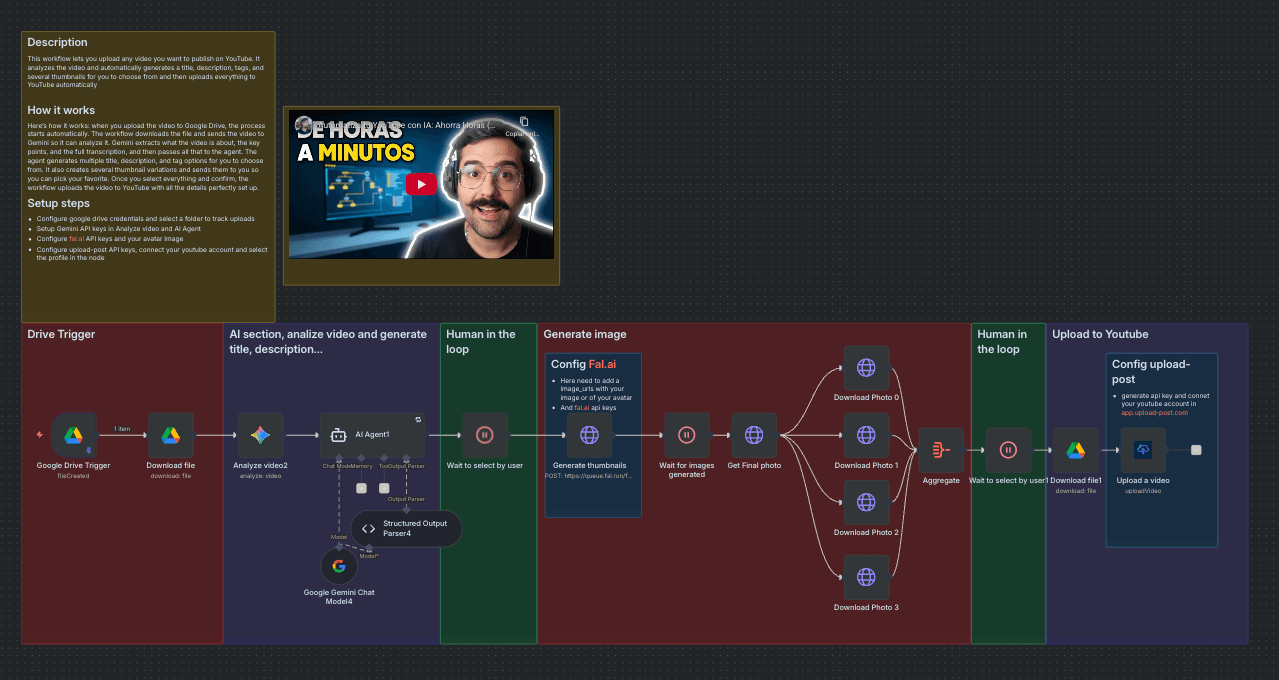
This workflow transforms any video you drop into a Google Drive folder into a ready-to-publish YouTube upload. It analyzes the video with AI to craft 3 high-CTR title ideas, 3 long SEO-friendly descriptions (with timestamps), and 10–15 optimized tags. It then generates 4 thumbnail options using your face and lets you pick your favorite before auto-publishing to YouTube via Upload-Post.
Who Is This For?
- YouTube Creators & Editors: Ship videos with winning titles, thumbnails, and SEO in minutes.
- Agencies & Media Teams: Standardize output and speed across channels and clients.
- Founders & Solo Makers: Maintain consistent publishing with minimal manual work.
What Problem Does It Solve?
Producing SEO metadata and high-performing thumbnails is slow and inconsistent. This flow:
- Generates High-CTR Options: 3 distinct angles for title/description/tags.
- Creates Thumbnails with Your Face: 4 options ready for review in one pass.
- Auto-Publishes Safely: Human selection gates reduce risk before going live.
How It Works
- Google Drive Trigger: Watches a folder for new video files.
- AI Video Analysis (Gemini): Produces an in-depth Spanish description and timestamps.
- Concept Generation: Returns 3 JSON concepts (title, thumbnail prompt, description, tags).
- User Review #1: Pick your favorite concept in a simple form.
- Thumbnail Generation (fal.ai): Creates 4 thumbnails using your face (provided image URL).
- User Review #2: Choose the best thumbnail.
- Upload to YouTube (Upload-Post): Publishes the video with your chosen title, description, tags, and thumbnail.
Setup
- Credentials (all offer free trials, no credit card required):
- Google Gemini (chat/vision for analysis)
- fal.ai API (thumbnail generation)
- Upload-Post (Connect your Youtube channel and generate api keys)
- Google Drive OAuth (folder watch + file download)
- Provide Your Face Image URL(s): Used by fal.ai to integrate your face into thumbnails.
- Select the Google Drive Folder: Where you’ll drop videos to process.
- Pick & Publish: Use the built-in forms to choose concept and thumbnail.