
 Reddit
  Slack
Slack  Mastodon
  Nostr
Nostr  Lemmy
Lemmy  Dev.to
  Hashnode
  WordPress
  Whop
Whop  Listmonk
  ChatGPT
 Claude
 Gemini
White Label Social Media Management एजेंसियों और SaaS के लिए
हर क्लाइंट को एक connect page का link भेजें, जिस पर आपका logo, आपका टेक्स्ट और आपकी theme हो। वे अपना TikTok, Instagram, YouTube या LinkedIn एक बार connect करते हैं। उसके बाद आप API, n8n या Make से उनके लिए पोस्ट और शेड्यूल करते हैं।
शुरू करना फ्री है, credit card नहीं चाहिए। White label Professional प्लान से शामिल है।
import { UploadPost } from 'upload-post';

const api = new UploadPost('YOUR_API_KEY');

// हर क्लाइंट के लिए एक profile
const client = 'client-harbor';
await api.createUser(client);

// Branded connect link, 48 घंटे तक valid
const { access_url } = await api.generateJwt(client, {
  logoImage: 'https://youragency.com/logo.png',
  connectTitle: 'Connect your accounts',
  redirectUrl: 'https://youragency.com/done',
  platforms: ['instagram', 'tiktok', 'linkedin']
});

// access_url अपने क्लाइंट को भेजें
असली screenshots
आपके क्लाइंट्स को क्या दिखता है
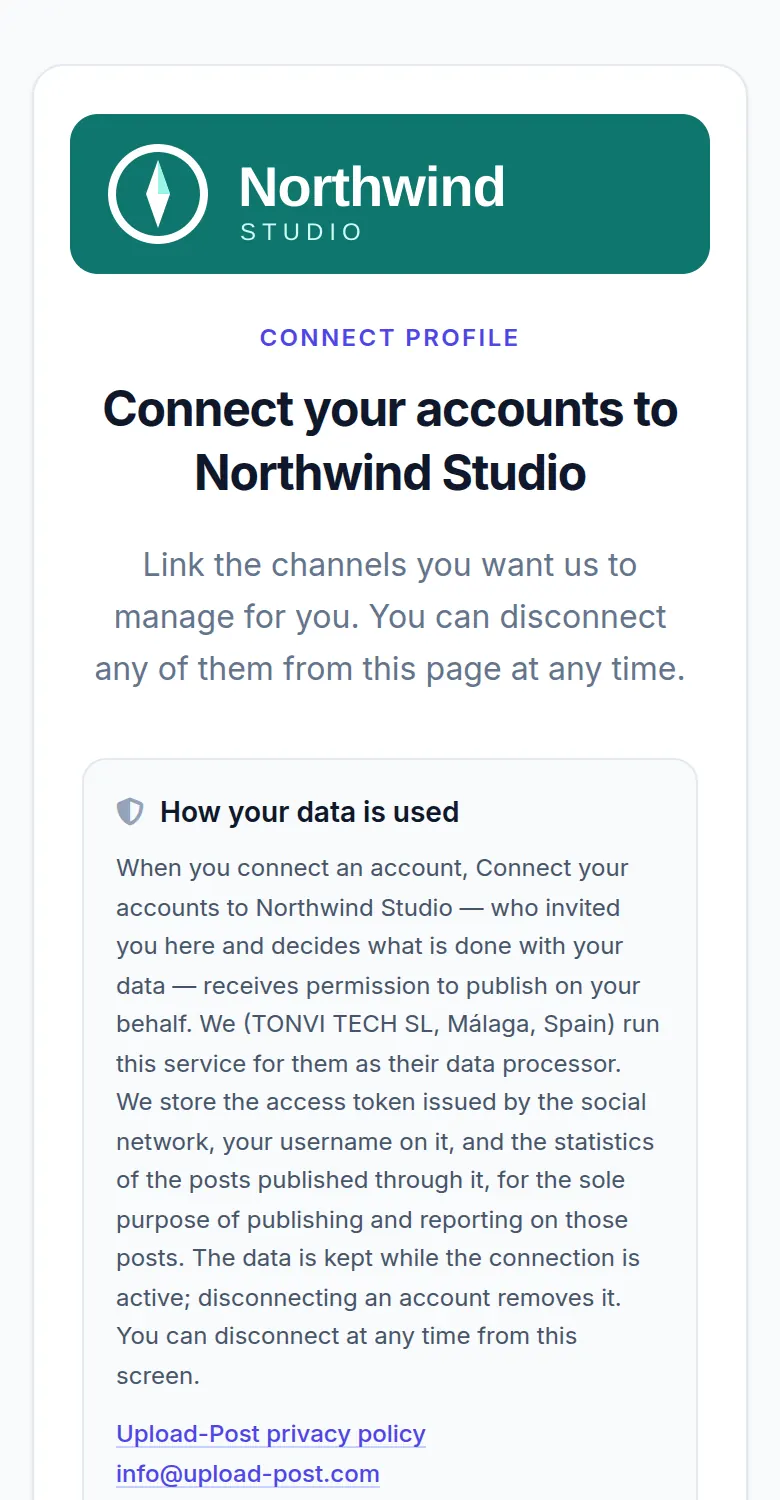
यह वही असली connect page है जो आपका क्लाइंट खोलता है, एक sample brand के साथ। Northwind Studio एक काल्पनिक एजेंसी है और "Harbor Demo Cafe" एक काल्पनिक क्लाइंट; page, layout और विकल्प असली हैं।
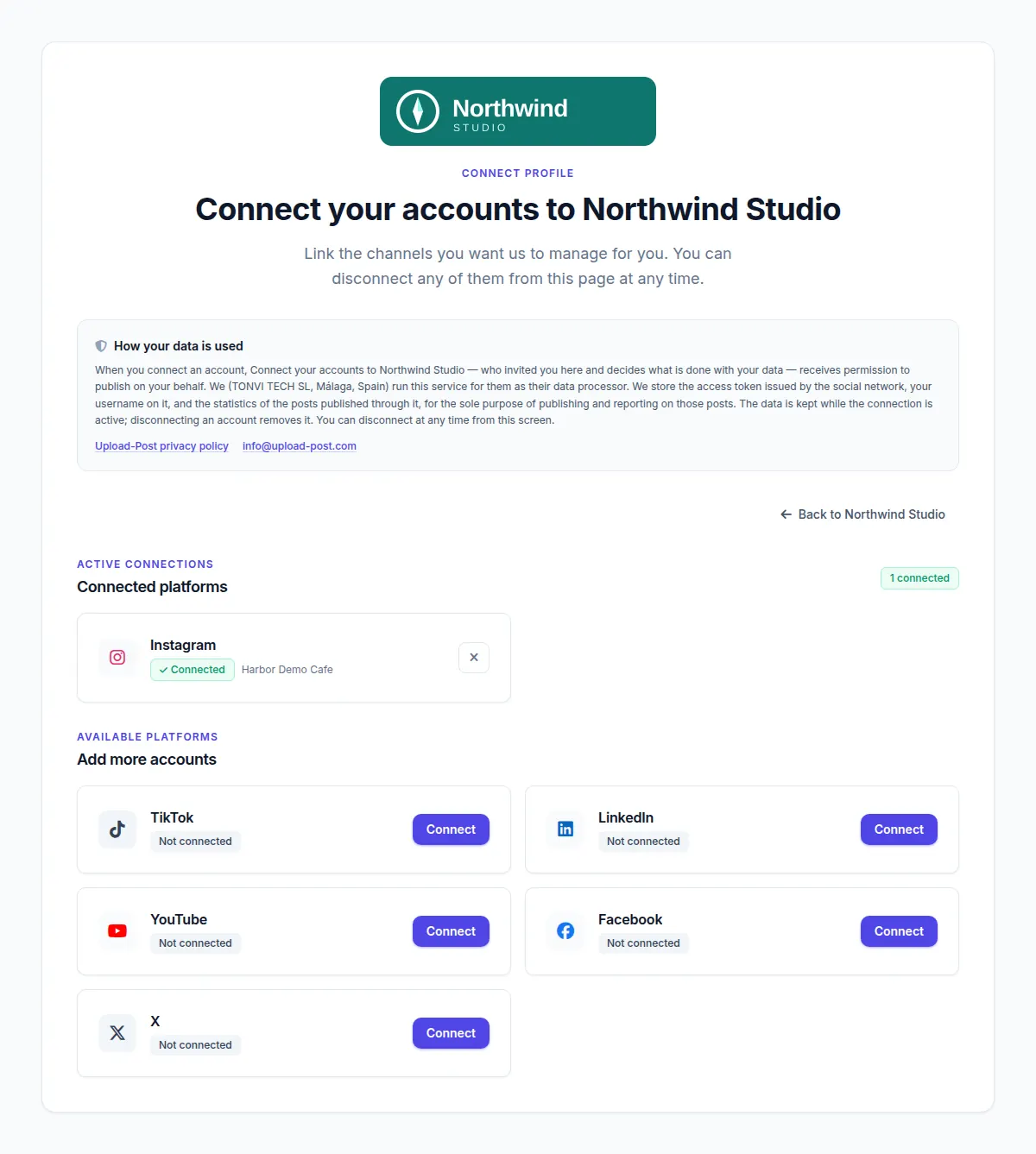
platforms से लिस्ट सिर्फ छह नेटवर्क तक सीमित।
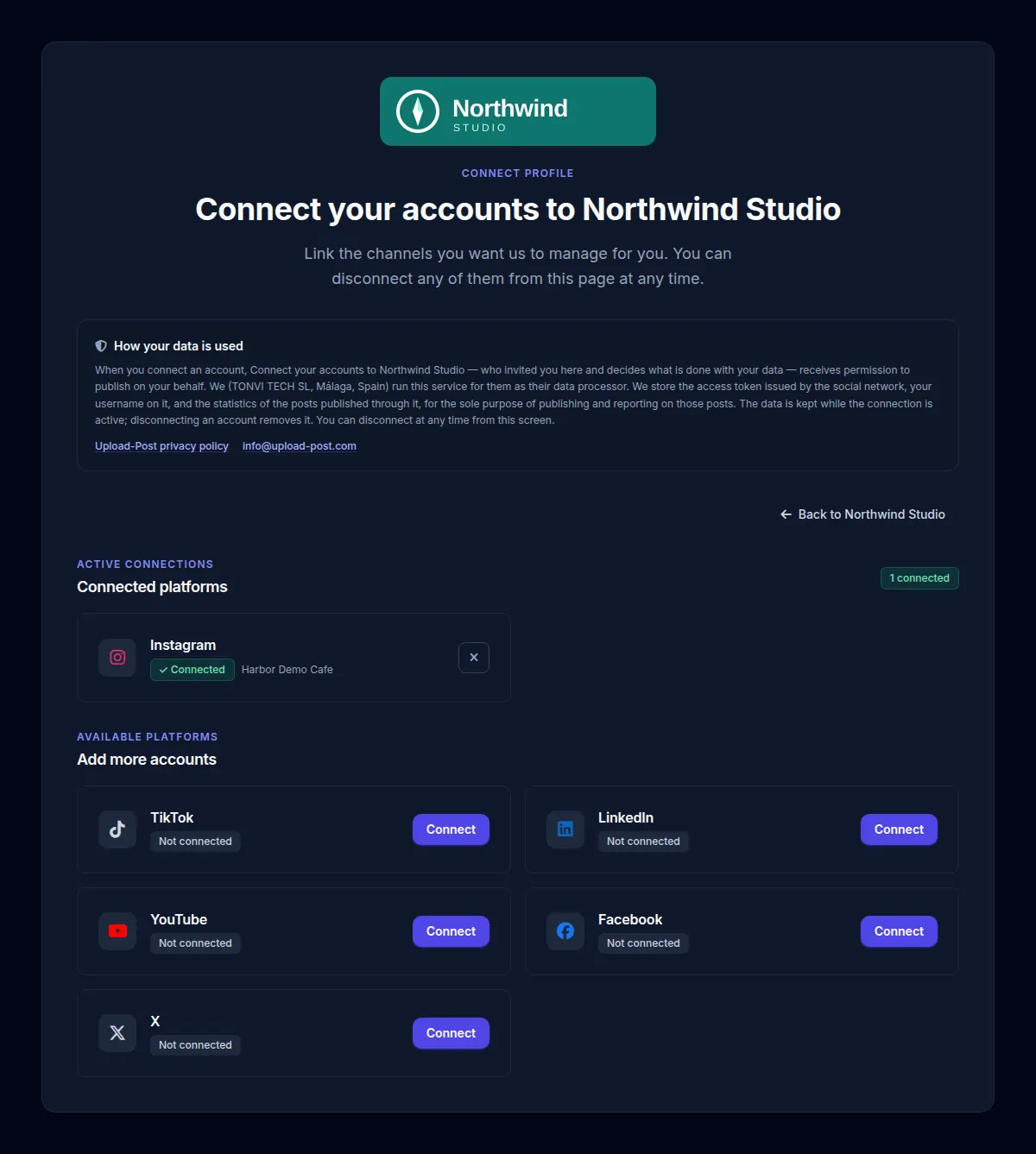
connect_theme: "dark" के साथ। Theme तय करने पर light/dark switch छिप जाता है, इसलिए हर क्लाइंट को आपकी चुनी हुई theme दिखती है।
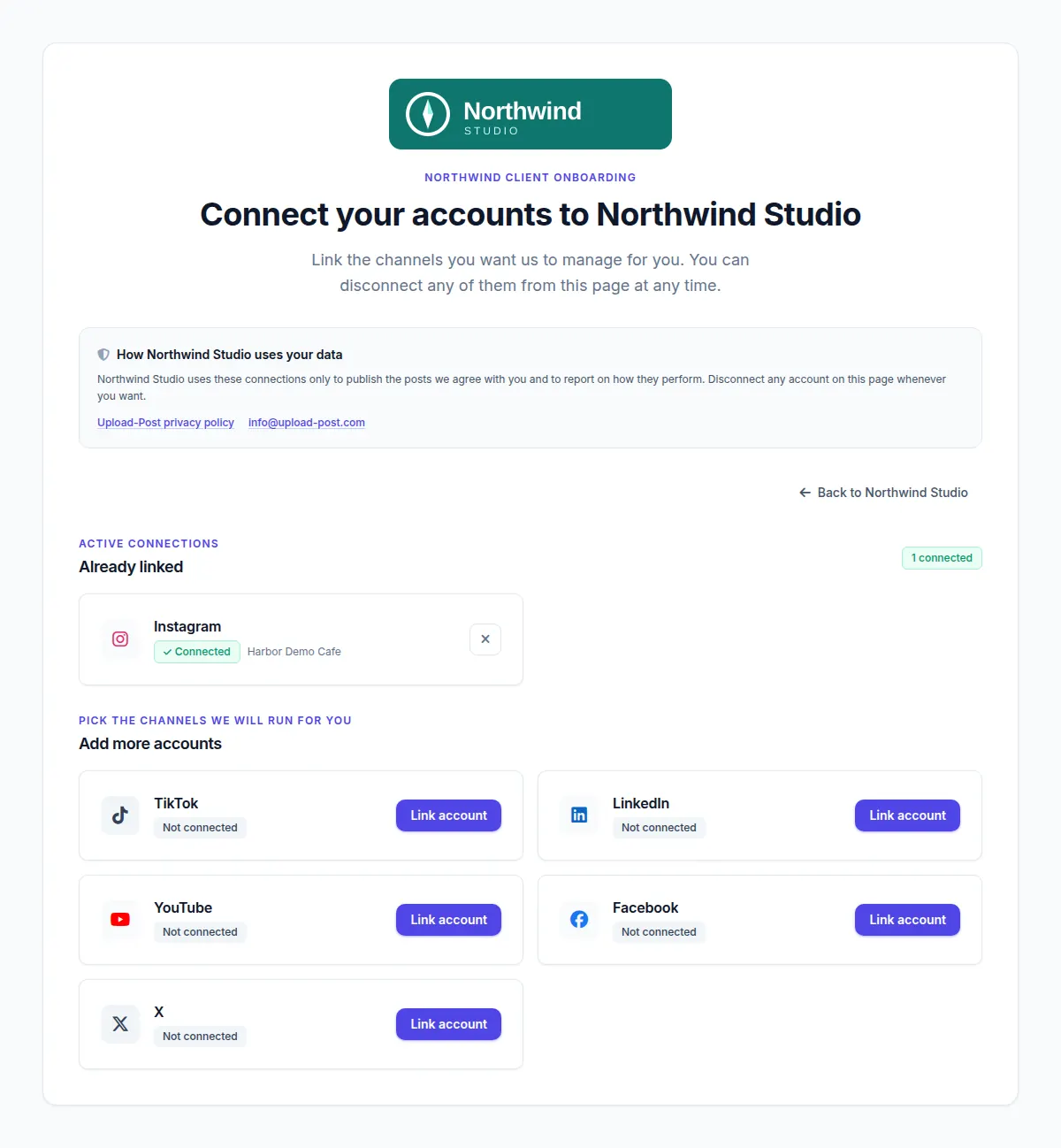
ui_labels से बदला गया टेक्स्ट: eyebrow, section titles, privacy टेक्स्ट और हर Connect button अब वही कहते हैं जो एजेंसी चाहती है।
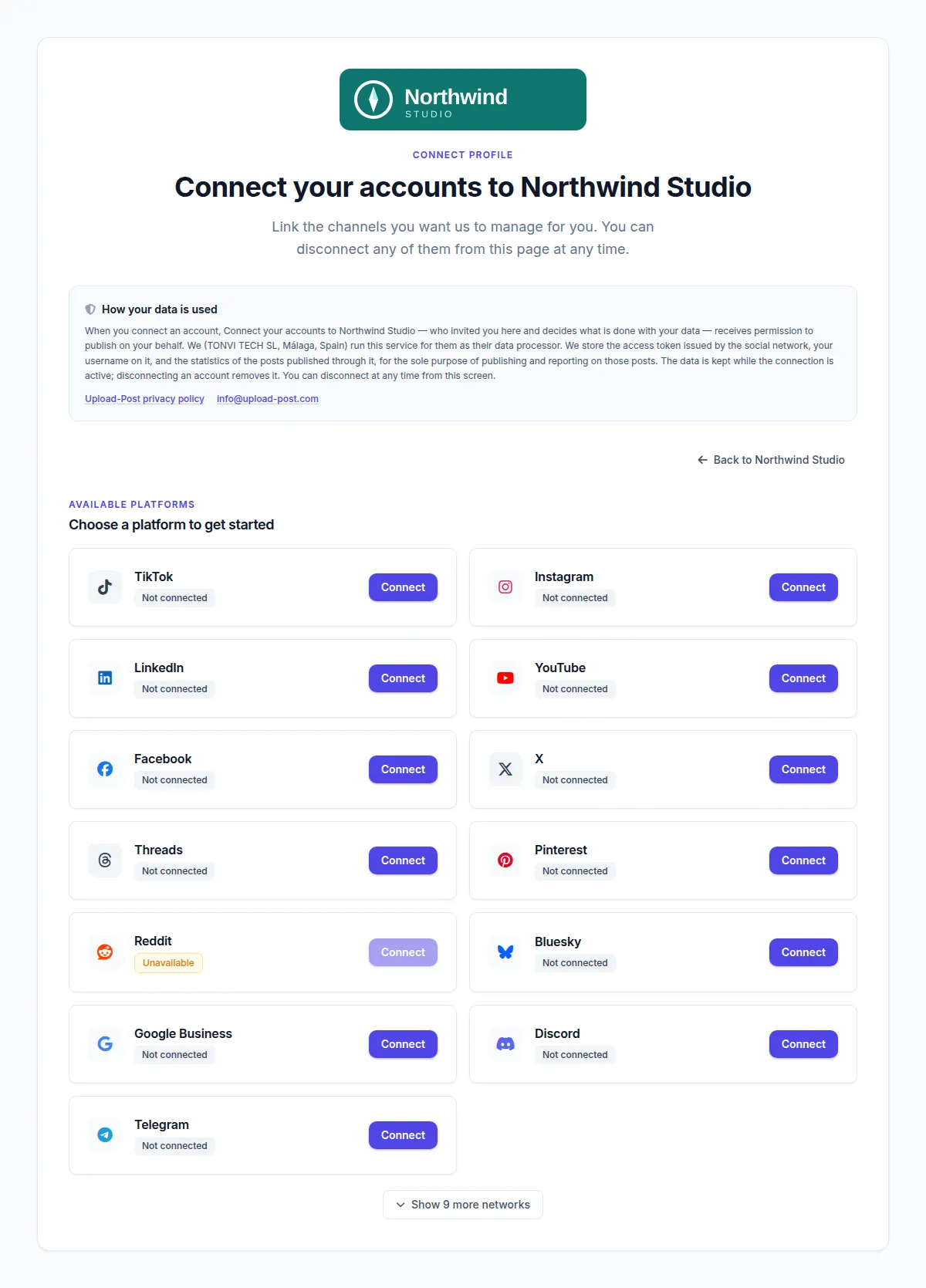
platforms के बिना क्लाइंट को सारे नेटवर्क दिखते हैं, कम इस्तेमाल होने वाले "Show 9 more networks" के पीछे। जिस दिन यह screenshot लिया गया, Reddit unavailable दिख रहा था।
उस page पर क्लाइंट क्या कर सकता है
- TikTok, Instagram, YouTube, LinkedIn और दूसरे OAuth नेटवर्क उसी नेटवर्क की अपनी sign-in screen पर connect करना, ताकि उनका password न आप तक पहुँचे, न Upload-Post तक। Bluesky, Telegram, Discord और कुछ और नेटवर्क इसकी जगह app password, bot token या webhook इस्तेमाल करते हैं।
- चुनना कि आप किस Facebook Page, LinkedIn company page या Google Business location पर पोस्ट करेंगे।
- जिस account का access expire हो गया हो उसे फिर से connect करना, या कभी भी कोई account disconnect करना।
- शेड्यूल किए गए posts का calendar देखना, अगर आप उसे चालू रखते हैं। Read-only विकल्प के साथ वे बस इतना ही कर सकते हैं।
- आपके दिए label वाले button से आपकी साइट पर वापस जाना।
Link एक ही profile से जुड़ा होता है। क्लाइंट सिर्फ अपने accounts देख और बदल सकता है, कभी आपके दूसरे क्लाइंट्स या आपकी API key नहीं।
एजेंसी के लिए यह कैसे काम करता है
नए क्लाइंट से उसकी पहली शेड्यूल की गई पोस्ट तक पाँच steps। हर step dashboard से भी होता है और API से भी।
- 1
हर क्लाइंट के लिए एक profile बनाएं
Dashboard में Manage Users पर जाकर profile जोड़ें, या
client-harborजैसे username के साथPOST /api/uploadposts/userscall करें। एक profile में हर नेटवर्क का एक account होता है। - 2
Branded connect link बनाएं
Profile के पास Share पर क्लिक करें और अपना logo, title, description, भाषा, redirect URL, button text और नेटवर्क भरें। या यही fields
POST /api/uploadposts/users/generate-jwtको भेजें। जवाब में आपको एकaccess_urlमिलता है जो 48 घंटे तक काम करता है। - 3
इसे अपने क्लाइंट को भेजें
Email, chat या अपने onboarding flow के अंदर। क्लाइंट को Upload-Post account की ज़रूरत नहीं है और उसे आपका dashboard कभी नहीं दिखता।
- 4
क्लाइंट अपने accounts connect करता है
वे TikTok, Instagram, YouTube या LinkedIn पर sign in करके access approve करते हैं। Tokens encrypted रखे जाते हैं और आपके लिए refresh होते रहते हैं। अगर आपने webhook सेट किया है, तो उसी पल आपको
social_account_connectedevent मिल जाता है। - 5
उनके लिए पोस्ट और शेड्यूल करें
user=client-harborके साथ पोस्ट करें और शेड्यूल करने के लिएscheduled_dateजोड़ें। यह dashboard से करें, अपने code से, n8n templates से, किसी Make scenario से या MCP server के ज़रिए किसी AI assistant से। हर क्लाइंट के आंकड़े analytics endpoint से निकालें।
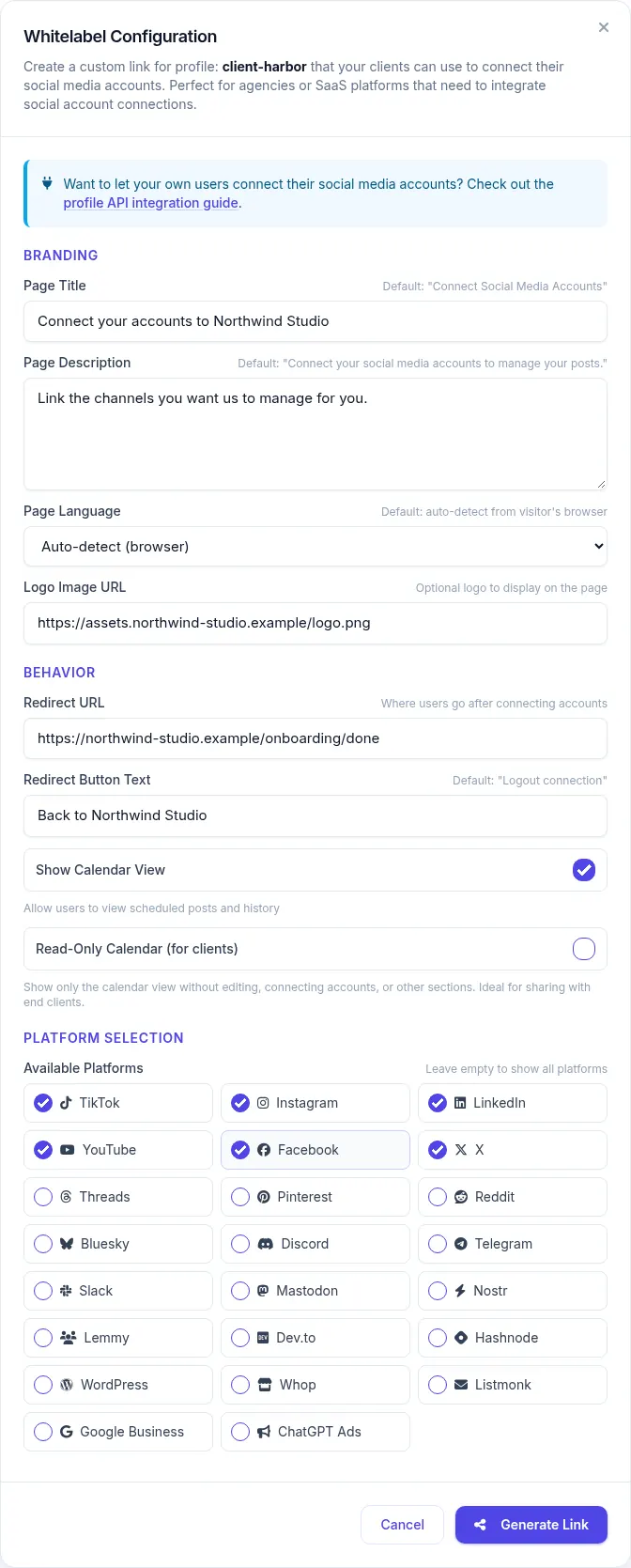
सारे Branding विकल्प
ये सभी generate-jwt call के fields हैं और क्लाइंट के profile पर save होते हैं। आखिरी column बताता है कि इसे dashboard से भी सेट कर सकते हैं या नहीं।
| विकल्प | Parameter | क्या करता है | उदाहरण | Dashboard |
|---|---|---|---|---|
| Logo | logo_image | Page के ऊपर आपका logo दिखाता है। कोई भी public http(s) image URL चलेगा। | "https://youragency.com/logo.png" | हाँ |
| Page title | connect_title | मुख्य heading बदल देता है, जो default में "Connect your social accounts" होती है। | "Connect your accounts to Northwind Studio" | हाँ |
| Description | connect_description | Heading के नीचे वाली टेक्स्ट लाइन बदल देता है। | "Link the channels we will manage for you." | हाँ |
| दिखने वाले नेटवर्क | platforms | सिर्फ वही नेटवर्क दिखते हैं जो आप लिस्ट करते हैं। इसे न भेजें तो क्लाइंट को सारे नेटवर्क दिखते हैं। | ["instagram", "tiktok", "linkedin"] | हाँ |
| Redirect URL | redirect_url | काम पूरा होने पर back button क्लाइंट को कहाँ ले जाए। | "https://youragency.com/onboarding/done" | हाँ |
| Back button का टेक्स्ट | redirect_button_text | उसी back button का label। | "Back to Northwind Studio" | हाँ |
| भाषा | language | English, Spanish, German, French, Portuguese, Polish या Turkish तय कर देता है। इसके बिना page browser की भाषा पर चलता है और बाकी मामलों में English दिखाता है। | "es" | हाँ |
| Page का कोई भी टेक्स्ट | ui_labels | Page की एक-एक string को उसकी key से बदलता है: buttons, section titles, privacy टेक्स्ट। 100 keys तक, हर एक 300 characters तक। | {"connect.card.connect": "Link account"} | सिर्फ API |
| Theme | connect_theme | Light या dark तय कर देता है और theme switch छिपा देता है। "auto" चुनाव फिर से visitor पर छोड़ देता है। | "dark" | सिर्फ API |
| Calendar tab | show_calendar | उस profile के शेड्यूल किए गए posts वाला calendar tab दिखाता या छिपाता है। Default में चालू। | false | हाँ |
| Read-only calendar | readonly_calendar | क्लाइंट सिर्फ calendar देख सकता है। वह posts edit या delete नहीं कर सकता, न accounts connect या disconnect कर सकता है। | true | हाँ |
सारे विकल्प एक ही request में
curl -X POST https://api.upload-post.com/api/uploadposts/users/generate-jwt \
  -H "Authorization: ApiKey YOUR_API_KEY" \
  -H "Content-Type: application/json" \
  -d '{
    "username": "client-harbor",
    "logo_image": "https://youragency.com/logo.png",
    "connect_title": "Connect your accounts to Northwind Studio",
    "connect_description": "Link the channels we will manage for you.",
    "platforms": ["instagram", "tiktok", "linkedin"],
    "redirect_url": "https://youragency.com/onboarding/done",
    "redirect_button_text": "Back to Northwind Studio",
    "language": "en",
    "connect_theme": "light",
    "ui_labels": { "connect.card.connect": "Link account" },
    "show_calendar": false
  }'
ध्यान रखने वाली बातें
- हर बार link बनाते समय पूरी branding भेजें। Logo, title, description, button text, redirect URL, नेटवर्क और भाषा अगर आप नहीं भेजते, तो profile से हट जाते हैं।
-
ui_labels,connect_themeऔर दोनों calendar switches तभी बदलते हैं जब आप इन्हें भेजते हैं। Labels reset करने के लिएnullया{}भेजें। - Labels उस भाषा का टेक्स्ट बदलते हैं जिसमें page उस समय दिख रहा है। अगर आपके labels English में हैं और क्लाइंट का browser French में है, तो बाकी page French में ही रहेगा, इसलिए
languageभी सेट करें। - Label keys और पूरा parameter reference User Profiles API docs में है।
क्या White-Label नहीं होता
बेहतर है कि आप यहीं पढ़ लें, बजाय इसके कि क्लाइंट से पता चले। Flow के ये हिस्से अब भी Upload-Post या सोशल नेटवर्क का नाम दिखाते हैं।
Address
Hosted page app.upload-post.com/connect पर रहता है। Custom domain या CNAME का विकल्प नहीं है। अगर आपको अपना domain चाहिए, तो Connect API से अपना page खुद बनाएं; OAuth callback फिर भी एक पल के लिए app.upload-post.com से होकर जाता है।
नेटवर्क की consent screens
जब क्लाइंट sign in करता है, तो TikTok, Meta, Google, LinkedIn और बाकी नेटवर्क अपनी screen पर वहाँ registered app दिखाते हैं, जो Upload-Post का approved app है। इसी वजह से आपको उनके app reviews से नहीं गुज़रना पड़ता।
Privacy box
Page पर हमेशा एक छोटा "How your data is used" note रहता है, जिसमें Upload-Post की privacy policy और [email protected] के links होते हैं। Default में यह TONVI TECH SL (Upload-Post के पीछे की कंपनी) को data processor बताता है। ui_labels से आप इसकी wording बदल सकते हैं, पर box और वे links रहते हैं।
Colors, tab title और आपका dashboard
आप light या dark चुनते हैं, brand color नहीं: buttons Upload-Post के indigo रंग में ही रहते हैं। Browser tab का title और icon Upload-Post के होते हैं। आपकी टीम जिस dashboard में login करती है, वह Upload-Post ही है, कोई rebranded app नहीं।
Integrations खुद क्यों न बनाएं?
सीधे integrations का मतलब है Meta और TikTok के साथ app reviews, token refresh का logic और API में टूटने वाले बदलाव, और यह सब हर नेटवर्क के लिए अलग। एक API के साथ आपको सारे नेटवर्क एक ही endpoint के पीछे मिलते हैं, ऊपर से connect page।
एजेंसियाँ
हर क्लाइंट के लिए एक profile, connect link पर आपका brand, पोस्ट और शेड्यूल एक ही जगह से
SaaS प्लेटफ़ॉर्म
हर नेटवर्क का अलग integration बनाए बिना अपने product में सोशल पब्लिशिंग जोड़ें
Content tools
Users जो बनाते हैं, उसे सीधे उनके अपने सोशल accounts पर शेयर करने दें
इसके पीछे की API Calls
उन developers के लिए जो इसे किसी SaaS या एजेंसी tool में embed कर रहे हैं। न कोई OAuth flow बनाना, न platform credentials संभालने।
हर क्लाइंट या user के लिए Profile बनाएं
Profile एक क्लाइंट (या आपके app के एक user) के सोशल accounts का container है। Username के तौर पर अपनी internal ID इस्तेमाल करें, ताकि वापस mapping करना आसान रहे।
curl -X POST https://api.upload-post.com/api/uploadposts/users \
  -H "Authorization: ApiKey YOUR_API_KEY" \
  -H "Content-Type: application/json" \
-d '{"username": "your-internal-user-id-123"}'Branded Connect URL बनाएं
Branding यहीं जाती है: logo, title, redirect URL, नेटवर्क और ऊपर की table के बाकी विकल्प। Response में access_url आता है, जो 48 घंटे तक valid है।
curl -X POST https://api.upload-post.com/api/uploadposts/users/generate-jwt \
  -H "Authorization: ApiKey YOUR_API_KEY" \
  -H "Content-Type: application/json" \
  -d '{
    "username": "your-internal-user-id-123",
    "redirect_url": "https://yourapp.com/social-connected",
    "logo_image": "https://yourapp.com/logo.png",
    "platforms": ["tiktok", "instagram", "youtube"]
}'क्लाइंट अपने Accounts Connect करता है
क्लाइंट या user को access_url पर भेजें। TikTok, Instagram और YouTube जैसे OAuth नेटवर्क पर वे सीधे नेटवर्क के साथ authenticate करते हैं, इसलिए Upload-Post को उनका password कभी नहीं दिखता, और मिलने वाले tokens encrypted रखे जाते हैं।
Upload-Post आपके लिए क्या संभालता है
OAuth 2.0 flows
Token refresh
Encrypted storage
उनकी ओर से पोस्ट या शेड्यूल करें
किसी भी upload request में profile का username user के रूप में डालें। अभी की जगह बाद में पब्लिश करने के लिए scheduled_date जोड़ें।
curl -X POST https://api.upload-post.com/api/upload \
  -H "Authorization: ApiKey YOUR_API_KEY" \
  -F "user=your-internal-user-id-123" \
  -F "video=@/path/to/video.mp4" \
  -F "title=New autumn menu" \
  -F "platform[]=tiktok" \
  -F "platform[]=instagram" \
-F "scheduled_date=2026-10-02T09:00:00Z"एक API Key, हर क्लाइंट का एक Profile
आपके सारे क्लाइंट एक ही account और एक ही API key के नीचे रहते हैं, हर एक अपने profile में, अपने सोशल accounts के साथ।
Profiles कैसे काम करते हैं
हर profile में हर नेटवर्क का एक account connect होता है। आपका प्लान तय करता है कि कितने profiles मिलेंगे, और profiles सोशल accounts की सीमा नहीं हैं: Professional पर आप एक साथ 25 TikTok accounts, 25 Instagram accounts और 25 LinkedIn accounts connected रख सकते हैं।
- अलग credentials: हर क्लाइंट के social tokens सिर्फ उसके profile के होते हैं
- हर क्लाइंट का webhook: connection और upload events के लिए हर profile को उसका अपना URL दें
- एक ही bill: एक subscription में सारे क्लाइंट
उदाहरण setup
| प्लान | शामिल profiles | मासिक billing | सालाना billing |
|---|---|---|---|
| Professional | 25 | $50/माह | $33/माह ($400/वर्ष) |
| Advanced | 75 | $147/माह | $118/माह ($1,411/वर्ष) |
| Business | 225, उसके बाद हर extra profile $1/माह | $438/माह | $350/माह ($4,205/वर्ष) |
USD कीमतें सितंबर 2026 के अनुसार। Euro कीमतें और Professional व Advanced के extra-profile packs pricing section में हैं, जो हमेशा ताज़ा source है।
White Label Social Media Integration कौन इस्तेमाल करता है?
SaaS प्लेटफ़ॉर्म
Content management systems, marketing automation platforms और business software।
Marketing एजेंसियाँ
Digital marketing एजेंसियाँ और social media management कंपनियाँ।
Content प्लेटफ़ॉर्म
Blogging platforms, video hosting sites और content बनाने वाले tools।
Education प्लेटफ़ॉर्म
Learning management systems और educational content platforms।
E-commerce प्लेटफ़ॉर्म
Online marketplaces और e-commerce solutions।
Video प्लेटफ़ॉर्म
Video hosting platforms और streaming services।
Technical Specifications और Compliance
Platform सपोर्ट
 TikTok
  Instagram
  YouTube
  Facebook
  LinkedIn
  X (Twitter)
  Threads
  Pinterest
  Bluesky
  Discord
  Telegram
 साथ में 11 और, जिनमें Google Business, Slack, Mastodon और WordPress शामिल हैं। सभी 22 प्लेटफ़ॉर्म देखें
Security features
Social media tokens at rest encrypted रखे जाते हैं।
OAuth नेटवर्क पर क्लाइंट उसी नेटवर्क की अपनी screen पर sign in करते हैं। उनका password न आपसे होकर गुज़रता है, न Upload-Post से।
हर connect link सिर्फ एक profile खोलता है और 48 घंटे बाद expire हो जाता है।
Client onboarding पर अपना Brand लगाएं
Profile बनाएं, Share पर क्लिक करें, link भेजें। आपका पहला branded connect page कुछ ही मिनटों में तैयार हो जाता है।
शुरू करना फ्री है, credit card नहीं चाहिए। White label Professional प्लान से।
White Label Social Media Management: FAQ
पहला branded connect link भेजने से पहले एजेंसियाँ और SaaS टीमें जो सवाल पूछती हैं
क्या मेरे क्लाइंट्स को Upload-Post account चाहिए?
नहीं। Connect link में उसी एक client profile का token होता है। आपका क्लाइंट link खोलता है, हर सोशल नेटवर्क पर sign in करता है और काम हो जाता है। Link 48 घंटे तक valid रहता है; उसके बाद आप नया link बना लेते हैं।
क्या connect page मेरे अपने domain पर चल सकता है?
Hosted page नहीं: वह हमेशा app.upload-post.com/connect पर ही रहता है और custom domain का विकल्प नहीं है। अगर address आपके लिए ज़रूरी है, तो Connect API से यह page अपनी साइट पर खुद बना सकते हैं। तब भी नेटवर्क क्लाइंट को एक पल के लिए app.upload-post.com से होकर वापस भेजता है, क्योंकि हर प्लेटफ़ॉर्म पर वही OAuth callback registered है।
White label किन प्लान में शामिल है?
Professional, Advanced और Business में। Free और Basic में यह नहीं है। Professional में 25 profiles, Advanced में 75 और Business में 225 मिलते हैं, और Business पर हर extra profile $1 प्रति माह का है। कोई sales call नहीं: प्लान आप pricing page पर खुद चुनते हैं।
एक profile में कितने client accounts आते हैं?
एक profile में हर नेटवर्क का एक account होता है, यानी एक profile में एक क्लाइंट के Instagram, TikTok, LinkedIn और YouTube connected हो सकते हैं। 25 profiles का मतलब है हर नेटवर्क पर 25 तक accounts, कुल मिलाकर 25 accounts नहीं। जिस क्लाइंट के दो Instagram accounts हैं, उसे दो profiles चाहिए।
क्या हर बार link बनाते समय branding भेजनी पड़ती है?
हाँ, logo, title, description, button text, redirect URL, networks और language के लिए। generate-jwt की हर call वही save करती है जो आप भेजते हैं, इसलिए जो field आप छोड़ देते हैं वह उस profile से हट जाता है। ui_labels, connect_theme, show_calendar और readonly_calendar अलग हैं: ये तभी बदलते हैं जब आप इन्हें भेजते हैं।
क्या मेरे क्लाइंट्स देख सकते हैं कि क्या शेड्यूल है?
हाँ। Calendar tab default में चालू रहता है और उस profile के शेड्यूल किए गए posts दिखाता है। readonly_calendar चालू करें तो link सिर्फ देखने वाला content calendar बन जाता है: क्लाइंट देख सकता है, पर edit, delete या connections नहीं बदल सकता। उसे सीधे खोलने के लिए उसी token के साथ /connect/calendar पर भेजें।
Connect page किन भाषाओं में उपलब्ध है?
English, Spanish, German, French, Portuguese, Polish और Turkish। हर profile के लिए language parameter से एक भाषा तय कर सकते हैं, या page को browser की भाषा के हिसाब से चलने दें। हिंदी इस सूची में नहीं है; किसी भी दूसरी wording के लिए ui_labels से आप टेक्स्ट खुद लिख सकते हैं, हिंदी में भी।
कैसे पता चलेगा कि क्लाइंट ने account connect कर लिया?
Webhooks से। Upload-Post social_account_connected, social_account_disconnected, social_account_reauth_required और upload_completed events भेजता है। हर profile का अपना webhook URL हो सकता है, इसलिए हर क्लाइंट आपके सिस्टम में अलग endpoint पर report कर सकता है।
क्या हर क्लाइंट की analytics अलग से निकाल सकते हैं?
हाँ। Analytics endpoint profile का username लेता है, इसलिए आपको एक बार में एक क्लाइंट के आंकड़े मिलते हैं और उन पर आप अपनी reports बना सकते हैं।
क्या आप SDKs देते हैं?
Python (pip install upload-post) और JavaScript/Node (npm install upload-post) के official SDKs हैं। बाकी सब API key वाली सीधी REST API है, इसलिए कोई भी भाषा या no-code tool जो HTTP requests भेज सकता है, काम करेगा।
Setup में कितना समय लगता है?
बिना code: Manage Users में profile बनाएं, Share पर क्लिक करें, अपनी branding भरें और link भेज दें। API से बस दो calls हैं, एक profile बनाने के लिए और एक link बनाने के लिए, साथ में वे upload calls जो पोस्ट करने के लिए आपको वैसे भी चाहिए।
मुझे क्या support मिलता है?
हर endpoint के लिए code samples वाला documentation, और [email protected] पर email support। Advanced और Business में priority support शामिल है।
ज़्यादा जानकारी: User Profiles API, Connect API, Webhooks और SDKs।