11 apps · read on each vendor’s site, 23 October 2026
The best cross-posting apps for short video
One video to TikTok, Reels and Shorts
A cross-posting app uploads one short video to TikTok, Instagram Reels and YouTube Shorts in a single step, with a caption and settings for each network. All eleven here auto-publish to the three. Pick Upload-Post to automate it, Repurpose.io to repost TikToks without the watermark, Buffer or Publer for a cheap queue, Metricool for analytics, or Post Bridge for cross-posting by hand.
Cross-posting apps compared
Free plan, entry price, API and bulk upload, as each vendor states them.
The tool should upload your clean video file to each network, not share a link or a download that carries another app’s watermark.
Settings per platform
TikTok privacy and duet options, a YouTube title, a Reels cover. One caption for everything works, but the best tools let you adjust each one.
True auto-publish
Some tools send a phone notification instead of posting, depending on the network, the account type or features like TikTok music. Check before you schedule a month.
Automation
An API, n8n, Make, Zapier or an MCP server lets a folder, a script or an AI video tool publish without you opening the app.
Pricing model
Per channel, per account, per brand, per user or flat. Count your channels and posts before comparing headline prices.
Each app in one paragraph
What it is, who it suits and where we read the facts.
1. Upload-Post
Best for: Automating cross-posts from a folder, a script or an AI pipeline
Our product, so weigh this entry accordingly. One upload goes to TikTok, Instagram Reels and YouTube Shorts, and to 19 more networks if you need them, with settings per platform (TikTok privacy, YouTube title, Reels cover). The same account works from the dashboard, the REST API, n8n, Make, Zapier and AI assistants such as Claude and ChatGPT, so a pipeline can publish every clip it produces without anyone opening an app.
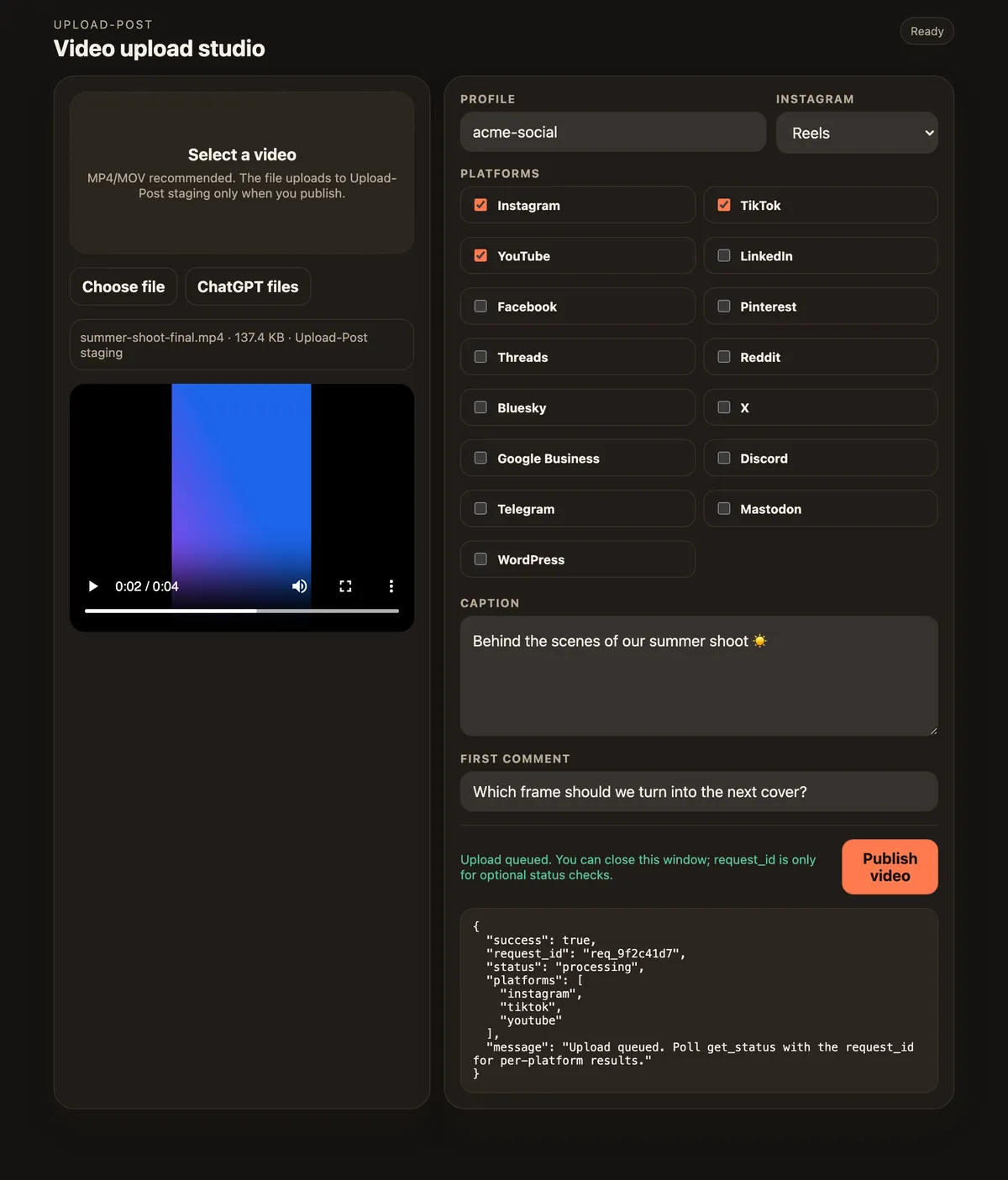
One video ticked for Instagram, TikTok and YouTube in Upload-Post’s upload studio inside ChatGPT, shown with a demo profile.
Best for: A simple calendar and queue for a few channels
A long-running scheduler that auto-publishes to TikTok, Reels and Shorts. Each post can publish automatically or send you a notification; TikTok music or polls, and Shorts longer than 3 minutes, go out as notifications.
Best for: Low per-account pricing with bulk CSV scheduling
Auto-publishes to all three and says it can cross-post TikTok videos to Reels and Shorts. One TikTok account per post, and trending TikTok sounds only work through the push-notification flow.
Best for: Scheduling plus analytics in one dashboard
Planning, scheduling and analytics together, priced by brand. TikTok works with every account type, including personal ones, and the CSV import handles video URLs.
Best for: Reposting TikToks to Reels and Shorts without the watermark
Built for one job: taking a video from one network to the others. It pulls the original TikTok before TikTok adds the watermark, resizes videos for each network and can trim them to 1 or 3 minutes for Shorts. Since 22 June 2026 auto publish is capped at 3 videos an hour.
Best for: Instagram-first creators who plan visually
A visual planner that grew up around Instagram. Its help center says YouTube Shorts are always auto-published, and notification publishing exists only for Instagram and TikTok.
Best for: Creators cross-posting short videos by hand
A tool focused on posting the same short video to several networks. Vertical videos of 3 minutes or less publish as YouTube Shorts automatically, and TikTok drafts are optional.
Best for: Creators who also want AI writing and video generation
Content creation and posting in one tool. A video attached to an Instagram post publishes as a Reel, and short files are cropped and resized automatically.
Best for: Category-based queues that recycle evergreen posts
A scheduler built around content categories. Shorts are detected automatically (9:16 or 1:1, up to 3 minutes); personal Instagram accounts get reminders instead of auto-publishing.
Best for: Teams that also need an inbox, listening and approvals
A full social media suite. It auto-publishes to all three, needs a TikTok Business account, and Instagram Creator profiles get notifications instead of auto-publishing.
Upload the original file to each network. A downloaded copy with another app’s watermark is the most common reason a reposted video underperforms.
Mind the music. A sound added inside TikTok is licensed for TikTok. On YouTube, a Short over one minute with an active copyright claim is blocked, so keep licensed music short or add it per network.
Shoot and export vertical 9:16, under 3 minutes. That one file fits TikTok, Reels and Shorts.
Write a caption per network. TikTok and Reels captions do the work of the title; YouTube Shorts needs a real title.
Use a professional Instagram account. Most apps can only auto-publish Reels to Business or Creator accounts; personal accounts get reminders.
Cross-post automatically with one API call
If your clips come out of an editor, an AI video tool or a folder, skip the app: one request publishes the same file to TikTok, Instagram Reels and YouTube Shorts. Add scheduled_date to publish later.
No code? The same step exists as a node in n8n, a module in Make and an action in Zapier, or ask Claude to do it.
cross-post.sh
curl -X POST https://api.upload-post.com/api/upload \
  -H "Authorization: Apikey YOUR_API_KEY" \
  -F "user=my-brand" \
  -F "platform[]=tiktok" \
  -F "platform[]=instagram" \
  -F "platform[]=youtube" \
  -F "video=@clip.mp4" \
  -F "title=How we edit a short in 10 minutes"
Post once, publish everywhere
Connect TikTok, Instagram and YouTube once and send every clip to all three, from the dashboard or your own workflow.
What is the best app to cross-post to TikTok, Instagram Reels and YouTube Shorts?
It depends on how you work. For hands-off automation from a folder, a script or an AI pipeline, Upload-Post (our product) publishes one upload to all three plus 19 more networks. Repurpose.io is built for reposting TikToks without the watermark, Buffer and Publer are simple and cheap for a few channels, Metricool adds analytics, and Post Bridge focuses on cross-posting short videos by hand.
Is there a free cross-posting app?
Yes. Buffer’s free plan covers 3 channels with 10 scheduled posts each, Publer’s 3 accounts with 10 posts each, and Metricool’s one brand with 20 posts a month. Upload-Post’s Free plan includes 10 uploads a month for Instagram, YouTube and most networks, with TikTok from the Basic plan.
How do I cross-post a TikTok to Reels and Shorts without the watermark?
Upload the original file to each network instead of a downloaded copy. If the original is gone, Repurpose.io says it pulls the version TikTok stores before the watermark is added. With an API such as Upload-Post’s, you send the clean file once and it goes to all three.
How long can a video be on TikTok, Reels and Shorts?
Through the API TikTok accepts 3 seconds to 10 minutes, Instagram Reels 3 seconds to 15 minutes, and YouTube counts vertical or square videos of up to 3 minutes as Shorts. Shorts longer than one minute with an active copyright claim are blocked by YouTube.
Does cross-posting the same video hurt reach?
Posting your own video on several networks is normal practice. What tends to hurt is reposting a downloaded copy that carries another app’s watermark, so upload the original file to each network and write a caption that fits each one.
Can I post the same video at a different time on each platform?
Yes. In Upload-Post, send one request per platform with its own scheduled_date, or let each platform’s queue slots decide. Most schedulers on this list let you set a time per network too.
Can I cross-post automatically from Google Drive or an AI video tool?
Yes. Upload-Post accepts a video URL, including Google Drive links, so an n8n, Make or Zapier workflow can publish every new file in a folder. AI video tools that output a file or URL can hand it to the same API call.
We use strictly necessary cookies to run this site. With your permission we would also like to measure how the site is used (analytics) and how our ads perform (marketing). Nothing optional is loaded until you choose. Cookie Policy · Privacy Policy
Cookie preferences
Choose which categories you allow. You can change this at any time from "Cookie settings" in the footer. Cookie Policy
Strictly necessary Always active
Needed for the site to work: your consent record (up_consent) and your light/dark theme preference. Exempt from consent under art. 22.2 LSSI.
Analytics Always active
OpenPanel, self-hosted on our own servers (api.openpanel.fotoexamen.com). Aggregated page and feature usage so we can see what to improve. No data goes to an advertising network.
Marketing and attribution
Google Ads conversion measurement, the Reddit advertising pixel, and our own affiliate/attribution cookies (aff_ref, up_attribution). These tell us which campaign or affiliate brought you here.

 TikTok
  Instagram
  YouTube
  LinkedIn
  Facebook
  X
X  Threads
  Pinterest
  Reddit
  Bluesky
  Discord
  Telegram
  Slack
Slack  Mastodon
  Nostr
Nostr  Lemmy
Lemmy  Dev.to
  Hashnode
  WordPress
  Whop
Whop  Listmonk
  ChatGPT
 Claude
 Gemini