
 Reddit
  Slack
Slack  Mastodon
  Nostr
Nostr  Lemmy
Lemmy  Dev.to
  Hashnode
  WordPress
  Whop
Whop  Listmonk
  ChatGPT
 Claude
 Gemini
White Label Social Media Management for Agencies and SaaS
Send each client a link to a connect page with your logo, your copy and your theme. They connect their TikTok, Instagram, YouTube or LinkedIn once. From then on you publish and schedule for them through the API, n8n or Make.
Free to start, no credit card. White label is included from the Professional plan.
import { UploadPost } from 'upload-post';

const api = new UploadPost('YOUR_API_KEY');

// One profile per client
const client = 'client-harbor';
await api.createUser(client);

// Branded connect link, valid for 48 hours
const { access_url } = await api.generateJwt(client, {
  logoImage: 'https://youragency.com/logo.png',
  connectTitle: 'Connect your accounts',
  redirectUrl: 'https://youragency.com/done',
  platforms: ['instagram', 'tiktok', 'linkedin']
});

// Send access_url to your client
Real screenshots
What Your Clients See
This is the actual connect page your client opens, rendered with a sample brand. Northwind Studio is a made-up agency and "Harbor Demo Cafe" a made-up client; the page, the layout and the options are the real ones.
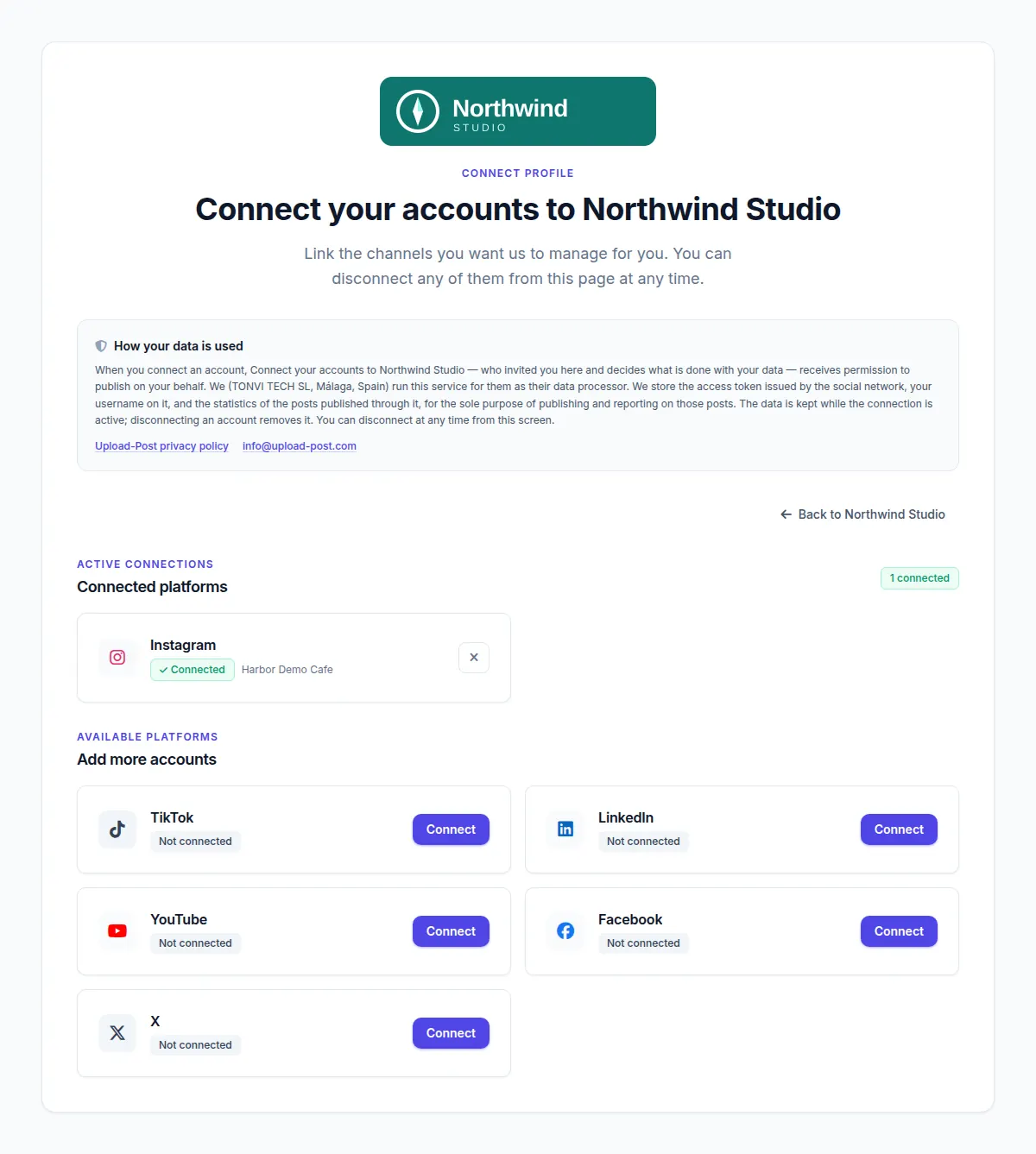
platforms.
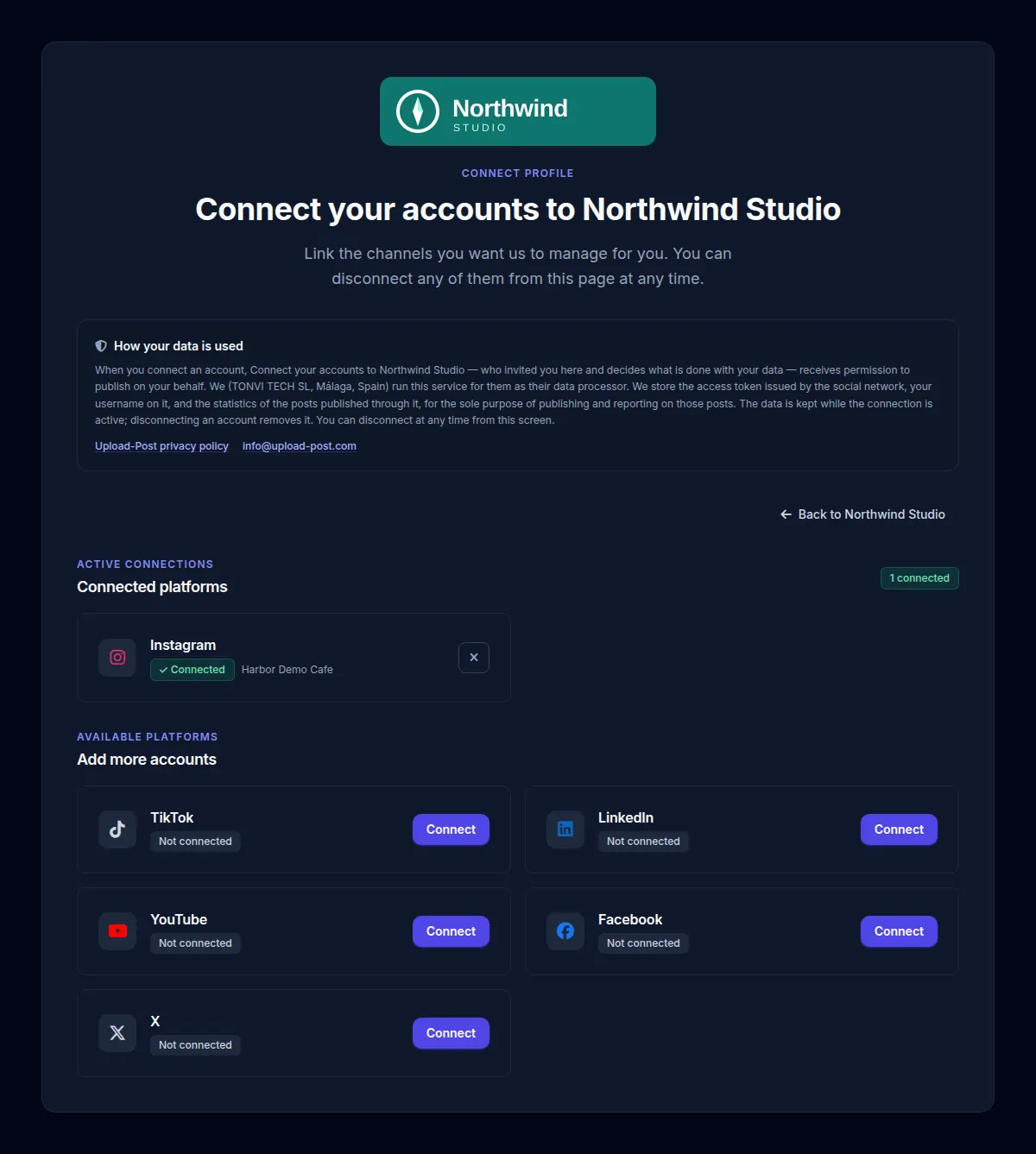
connect_theme: "dark". A forced theme hides the light/dark switch, so every client sees your choice.
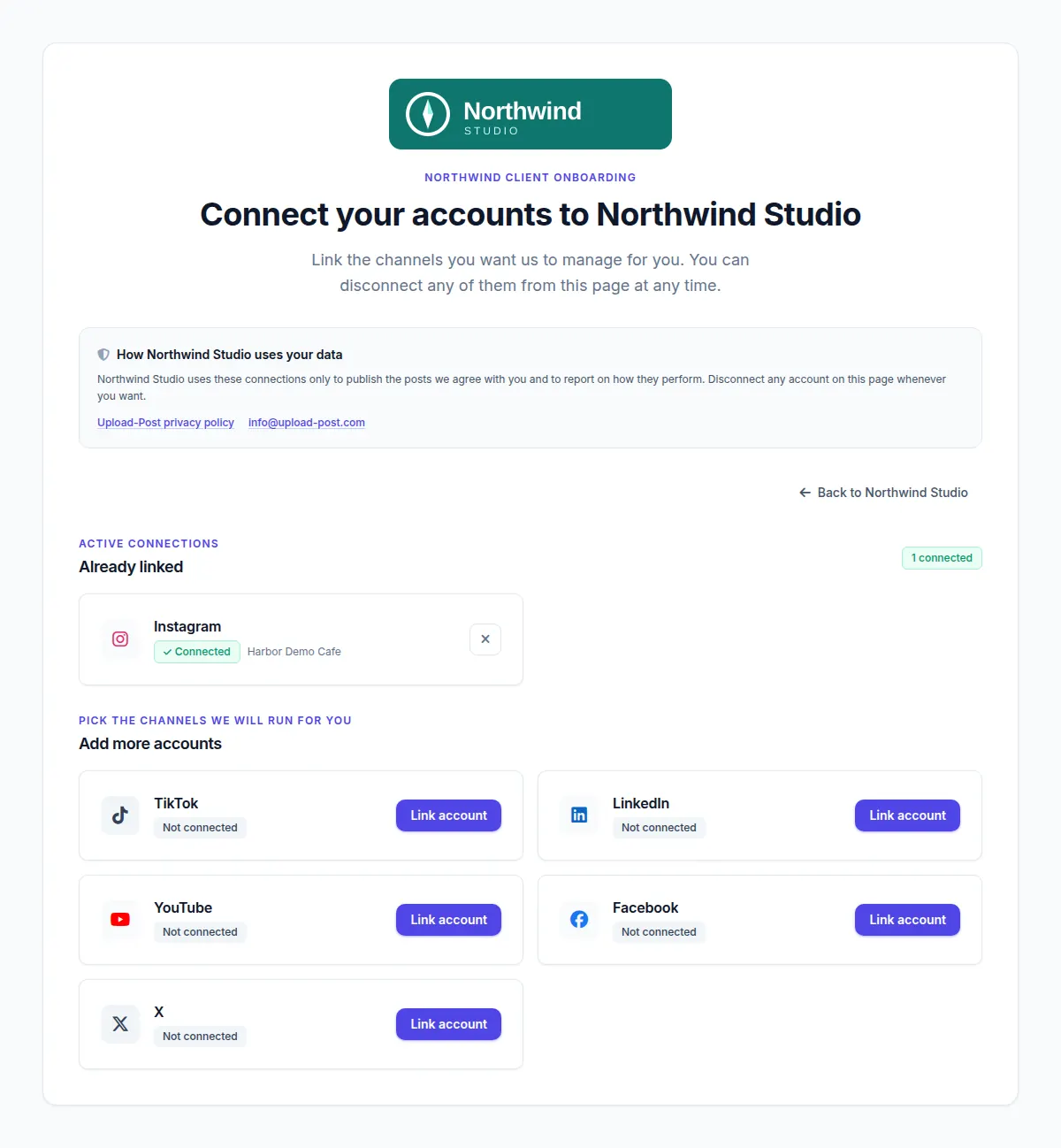
ui_labels: the eyebrow, the section titles, the privacy text and every Connect button now say what the agency wants.
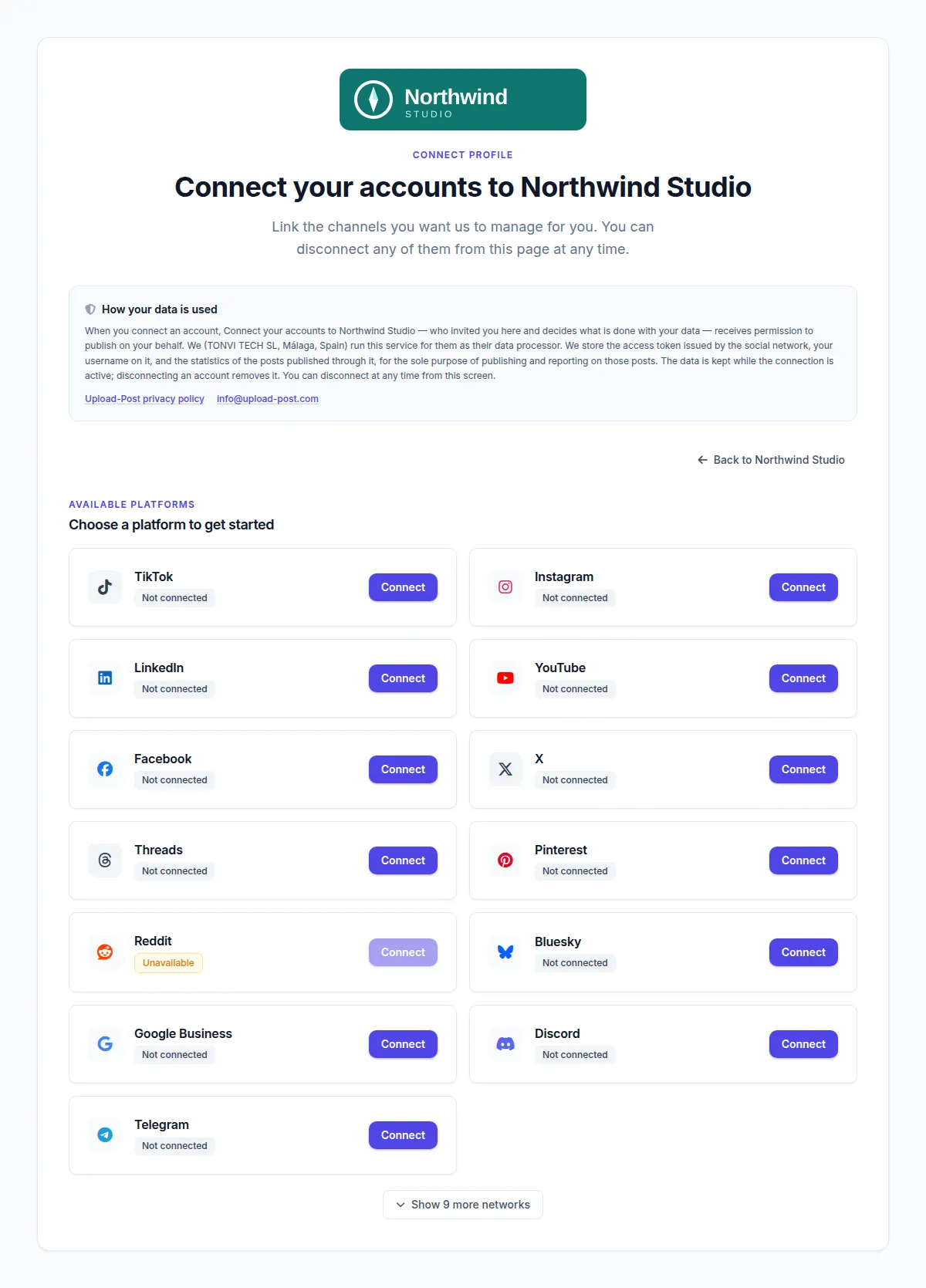
platforms the client sees every network, with the less common ones behind "Show 9 more networks". Reddit showed as unavailable on the day we took it.
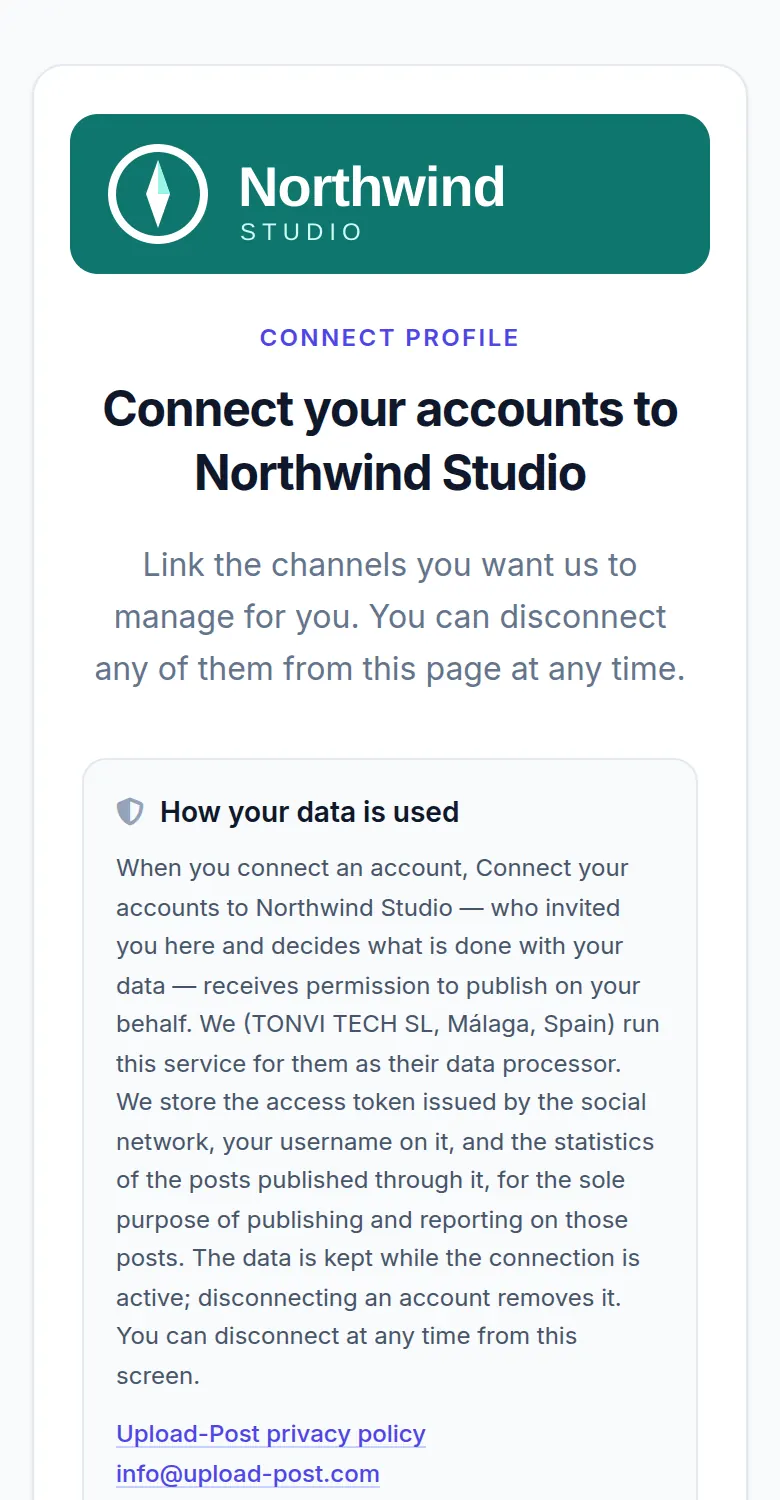
What the client can do on that page
- Connect TikTok, Instagram, YouTube, LinkedIn and the other OAuth networks on the network's own sign-in screen, so their password never reaches you or Upload-Post. Bluesky, Telegram, Discord and a few others use an app password, bot token or webhook instead.
- Pick which Facebook Page, LinkedIn company page or Google Business location you will post to.
- Reconnect an account whose access expired, or disconnect one at any time.
- Look at the calendar of scheduled posts, if you leave it on. With the read-only option that is all they can do.
- Go back to your site with the button you labelled.
The link is tied to one profile. A client can only ever see and change their own accounts, never your other clients or your API key.
How It Works for an Agency
Five steps from a new client to their first scheduled post. Every step works from the dashboard or from the API.
- 1
Create one profile per client
In the dashboard go to Manage Users and add a profile, or call
POST /api/uploadposts/userswith a username such asclient-harbor. A profile holds one account per network. - 2
Generate the branded connect link
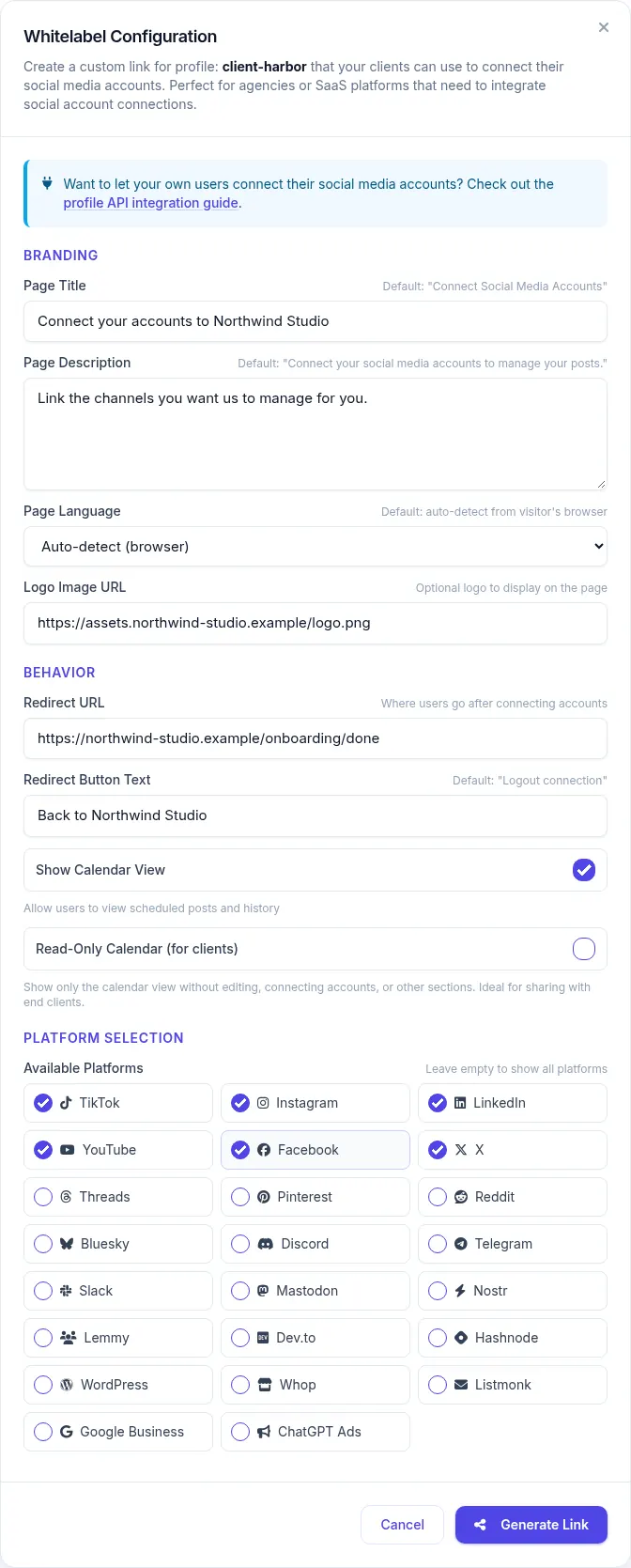
Click Share next to the profile and fill in your logo, title, description, language, redirect URL, button text and networks. Or send the same fields to
POST /api/uploadposts/users/generate-jwt. You get back anaccess_urlthat works for 48 hours. Step by step, including your own connect page: how to let clients connect their accounts. Comparing costs? What 30 client brands cost in each tool. - 3
Send it to your client
By email, chat or inside your own onboarding flow. The client does not need an Upload-Post account and never sees your dashboard.
- 4
The client connects their accounts
They sign in on TikTok, Instagram, YouTube or LinkedIn and approve access. Tokens are stored encrypted and refreshed for you. If you set up a webhook, you get a
social_account_connectedevent the moment it happens. - 5
Publish and schedule for them
Post with
user=client-harborand addscheduled_dateto schedule it. Do it from the dashboard, from your code, from n8n templates, a Make scenario or an AI assistant through the MCP server. Pull per-client numbers from the analytics endpoint.
Every Branding Option
All of them are fields of the generate-jwt call and are saved on the client's profile. The last column says whether you can also set it from the dashboard.
| Option | Parameter | What it does | Example | Dashboard |
|---|---|---|---|---|
| Logo | logo_image | Shows your logo at the top of the page. Any public http(s) image URL. | "https://youragency.com/logo.png" | Yes |
| Page title | connect_title | Replaces the main heading, which by default reads "Connect your social accounts". | "Connect your accounts to Northwind Studio" | Yes |
| Description | connect_description | Replaces the line of text under the heading. | "Link the channels we will manage for you." | Yes |
| Networks shown | platforms | Only the networks you list appear. Leave it out and the client sees every network. | ["instagram", "tiktok", "linkedin"] | Yes |
| Redirect URL | redirect_url | Where the back button takes the client when they are done. | "https://youragency.com/onboarding/done" | Yes |
| Back button text | redirect_button_text | The label of that back button. | "Back to Northwind Studio" | Yes |
| Language | language | Forces English, Spanish, German, French, Portuguese, Polish or Turkish. Without it the page follows the browser language and falls back to English. | "es" | Yes |
| Any text on the page | ui_labels | Rewrites single strings of the page by their key: buttons, section titles, the privacy text. Up to 100 keys, 300 characters each. | {"connect.card.connect": "Link account"} | API only |
| Theme | connect_theme | Forces light or dark and hides the theme switch. "auto" hands the choice back to the visitor. | "dark" | API only |
| Calendar tab | show_calendar | Shows or hides a calendar tab with the posts scheduled for that profile. On by default. | false | Yes |
| Read-only calendar | readonly_calendar | The client only sees the calendar. They cannot edit or delete posts, or connect and disconnect accounts. | true | Yes |
All options in one request
curl -X POST https://api.upload-post.com/api/uploadposts/users/generate-jwt \
  -H "Authorization: ApiKey YOUR_API_KEY" \
  -H "Content-Type: application/json" \
  -d '{
    "username": "client-harbor",
    "logo_image": "https://youragency.com/logo.png",
    "connect_title": "Connect your accounts to Northwind Studio",
    "connect_description": "Link the channels we will manage for you.",
    "platforms": ["instagram", "tiktok", "linkedin"],
    "redirect_url": "https://youragency.com/onboarding/done",
    "redirect_button_text": "Back to Northwind Studio",
    "language": "en",
    "connect_theme": "light",
    "ui_labels": { "connect.card.connect": "Link account" },
    "show_calendar": false
  }'
Good to know
- Send the full branding every time you generate a link. Logo, title, description, button text, redirect URL, networks and language are cleared on the profile when you leave them out.
-
ui_labels,connect_themeand the two calendar switches only change when you send them. Sendnullor{}to reset the labels. - Labels replace text in whatever language the page is showing. If your labels are in English and a client's browser is in French, the rest of the page stays French, so set
languageas well. - The label keys and the full parameter reference are in the User Profiles API docs.
What Is Not White-Labeled
Better you read it here than find out from a client. These parts of the flow still show Upload-Post or the social network.
The address
The hosted page lives on app.upload-post.com/connect. There is no custom domain or CNAME option. If you need your own domain, build your own page with the Connect API; the OAuth callback still passes through app.upload-post.com for a moment.
The networks' consent screens
When the client signs in, TikTok, Meta, Google, LinkedIn and the rest show their own screen with the app registered there, which is Upload-Post's approved app. That is also why you skip their app reviews.
The privacy box
A short "How your data is used" note is always on the page, with links to the Upload-Post privacy policy and info@upload-post.com. By default it names TONVI TECH SL, the company behind Upload-Post, as the data processor. You can rewrite the wording with ui_labels, but the box and those links stay.
Colors, tab title and your dashboard
You choose light or dark, not a brand color: buttons keep Upload-Post's indigo. The browser tab title and icon are Upload-Post's. The dashboard your team logs into is Upload-Post, not a rebranded app.
Why Not Build the Integrations Yourself?
Direct integrations mean app reviews with Meta and TikTok, token refresh logic and breaking API changes, once per network. With one API you get every network behind one endpoint and the connect page on top.
Agencies
One profile per client, your brand on the connect link, posts and schedules from one place
SaaS Platforms
Add social publishing to your product through one unified social media API instead of one integration per network
Content Tools
Let users share what they make straight to their own social accounts
The API Calls Behind It
For developers embedding this in a SaaS or an agency tool. No OAuth flows to build and no platform credentials to manage.
Create a Profile for Each Client or User
A profile is the container for the social accounts of one client (or one user of your app). Use your own internal ID as the username so mapping back is trivial.
curl -X POST https://api.upload-post.com/api/uploadposts/users \
  -H "Authorization: ApiKey YOUR_API_KEY" \
  -H "Content-Type: application/json" \
-d '{"username": "your-internal-user-id-123"}'Generate the Branded Connect URL
This is where the branding goes: logo, title, redirect URL, networks and the rest of the options in the table above. The response contains access_url, valid for 48 hours.
curl -X POST https://api.upload-post.com/api/uploadposts/users/generate-jwt \
  -H "Authorization: ApiKey YOUR_API_KEY" \
  -H "Content-Type: application/json" \
  -d '{
    "username": "your-internal-user-id-123",
    "redirect_url": "https://yourapp.com/social-connected",
    "logo_image": "https://yourapp.com/logo.png",
    "platforms": ["tiktok", "instagram", "youtube"]
}'The Client Connects Their Accounts
Send the client or user to access_url. On OAuth networks such as TikTok, Instagram and YouTube they authenticate directly with the network, so Upload-Post never sees their password, and the resulting tokens are stored encrypted.
What Upload-Post Handles for You
OAuth 2.0 Flows
Token Refresh
Encrypted Storage
Publish or Schedule on Their Behalf
Include the profile username as user in any upload request. Add scheduled_date to publish later instead of now.
curl -X POST https://api.upload-post.com/api/upload \
  -H "Authorization: ApiKey YOUR_API_KEY" \
  -F "user=your-internal-user-id-123" \
  -F "video=@/path/to/video.mp4" \
  -F "title=New autumn menu" \
  -F "platform[]=tiktok" \
  -F "platform[]=instagram" \
-F "scheduled_date=2026-10-02T09:00:00Z"One API Key, One Profile per Client
All your clients live under a single account and a single API key, each in its own profile with its own social accounts.
How profiles work
Each profile connects one account per network. Your plan sets how many profiles you get, and profiles are not a cap on social accounts: on Professional you can have 25 TikTok accounts, 25 Instagram accounts and 25 LinkedIn accounts connected at the same time.
- Separate credentials: each client's social tokens belong to their profile only
- Webhook per client: give each profile its own URL for connection and upload events
- One bill: a single subscription covers every client
Example setup
| Plan | Profiles included | Monthly billing | Annual billing |
|---|---|---|---|
| Professional | 25 | $50/mo | $33/mo ($400/yr) |
| Advanced | 75 | $147/mo | $118/mo ($1,411/yr) |
| Business | 225, then $1/mo per extra profile | $438/mo | $350/mo ($4,205/yr) |
USD prices as of September 2026. Euro prices and extra-profile packs for Professional and Advanced are on the pricing section, which is always the current source.
Who Uses White Label Social Media Integration?
SaaS Platforms
Content management systems, marketing automation platforms, and business software.
Marketing Agencies
Digital marketing agencies and social media management companies.
Content Platforms
Blogging platforms, video hosting sites, and content creation tools.
Educational Platforms
Learning management systems and educational content platforms.
E-commerce Platforms
Online marketplaces and e-commerce solutions.
Video Platforms
Video hosting platforms and streaming services.
Technical Specifications & Compliance
Platform Support
 TikTok
  Instagram
  YouTube
  Facebook
  LinkedIn
  X (Twitter)
  Threads
  Pinterest
  Bluesky
  Discord
  Telegram
 Plus 11 more, including Google Business, Slack, Mastodon and WordPress. See all 22 platforms
Security Features
Social media tokens are encrypted at rest.
On OAuth networks clients sign in on the network's own screen. Their password never passes through you or Upload-Post.
Each connect link only opens one profile and expires after 48 hours.
Put Your Brand on the Client Onboarding
Create a profile, click Share, send the link. Your first branded connect page takes a few minutes.
Free to start, no credit card. White label from the Professional plan.
White Label Social Media Management: FAQ
Questions agencies and SaaS teams ask before sending their first branded connect link
Do my clients need an Upload-Post account?
No. The connect link carries a token for that one client profile. Your client opens it, signs in on each social network and is done. The link is valid for 48 hours; after that you generate a new one.
Can I put the connect page on my own domain?
Not the hosted page: it always lives on app.upload-post.com/connect and custom domains are not available. If the address matters, the Connect API lets you build the page on your own site. Even then the network sends the client back through app.upload-post.com for a moment, because that is the OAuth callback registered with each platform.
Which plans include white label?
Professional, Advanced and Business. Free and Basic do not include it. Professional comes with 25 profiles, Advanced with 75 and Business with 225, and on Business every extra profile costs $1 a month. No sales call: you pick the plan on the pricing page.
How many client accounts fit in a profile?
A profile holds one account per network, so one profile can be a client with Instagram, TikTok, LinkedIn and YouTube connected. 25 profiles means up to 25 accounts on every network, not 25 accounts in total. A client with two Instagram accounts needs two profiles.
Do I have to send the branding every time I create a link?
Yes, for the logo, title, description, button text, redirect URL, networks and language. Each call to generate-jwt saves exactly what you send, so a field you leave out is cleared on that profile. ui_labels, connect_theme, show_calendar and readonly_calendar are different: they only change when you send them.
Can my clients see what is scheduled?
Yes. The calendar tab is on by default and shows the posts scheduled for that profile. Turn on readonly_calendar and the link becomes a view-only content calendar: the client can look but cannot edit, delete or change connections. Send them to /connect/calendar with the same token to open it directly.
Which languages does the connect page support?
English, Spanish, German, French, Portuguese, Polish and Turkish. You can force one per profile with the language parameter or let the page follow the browser. For any other wording, ui_labels lets you write the text yourself.
How do I know when a client has connected an account?
With webhooks. Upload-Post sends social_account_connected, social_account_disconnected, social_account_reauth_required and upload_completed events. Each profile can have its own webhook URL, so every client can report to a different endpoint in your system.
Can I pull analytics per client?
Yes. The analytics endpoint takes the profile username, so you get the numbers of one client at a time and can build your own reports on top.
Do you provide SDKs?
There are official SDKs for Python (pip install upload-post) and JavaScript/Node (npm install upload-post). Everything else is a plain REST API with an API key, so any language or no-code tool that can send HTTP requests works.
How long does setup take?
Without code: create a profile in Manage Users, click Share, fill in your branding and send the link. With the API it is two calls, one to create the profile and one to generate the link, plus the upload calls you already need to post.
What support do I get?
Documentation with code samples for every endpoint, and email support at info@upload-post.com. Advanced and Business include priority support.
More detail: User Profiles API, Connect API, Webhooks and SDKs.