The best MCP servers for social media
12 servers that let AI assistants post for you
A social media MCP server lets Claude, ChatGPT, Cursor or any AI agent publish, schedule and analyze posts through tools instead of code. The strongest options in 2026 are Upload-Post, Postiz, Buffer, Zernio, Ayrshare and Metricool. Which one fits depends on whether it works in your client, the networks you need and how you want to pay.
Quick picks
One hosted server, most tools, free planUpload-Post
Upload-Post is our product. Every other row was read on the vendor’s own docs, linked below each entry, and each remote endpoint was probed on 23 October 2026.
Social media MCP servers compared
Endpoint, sign-in, tools, networks, comments and DMs, and the plan you need.
MCP details from each vendor’s docs on 23 October 2026; prices from their pricing pages on 29 September 2026. “About” marks a tool count we counted ourselves because the vendor does not state it.
How to choose a social media MCP server
Six questions decide it faster than any feature list.
Remote or local
A remote server is a URL, so it works in claude.ai, the Claude desktop app and ChatGPT. A local server runs on your machine and only works in desktop and terminal clients such as Claude Code or Cursor.
OAuth or a fixed key
Claude and ChatGPT connectors sign in with OAuth. A server that only accepts a fixed API key needs a client where you can set headers, such as Claude Code or Cursor.
Networks you actually need
TikTok, Instagram, YouTube and LinkedIn are everywhere. Threads, Bluesky, Pinterest, Reddit and Google Business Profile vary by server.
Tools beyond posting
Only some servers expose comments, DMs and analytics. Those let one agent run the whole loop instead of only pressing publish.
Pricing model
Per account, per profile, per post or flat. An agent that posts many times a day gets expensive on per-post pricing; many accounts get expensive on per-account pricing.
How credentials are handled
Prefer OAuth or a header over an API key in the URL, which can end up in logs and browser history.
Each server in one paragraph
What it is, who it suits and where we read the facts.
1. Upload-Post
Best for: One hosted server for publishing, scheduling, comments, DMs and analytics
Our own product, so weigh this entry accordingly. One remote URL gives Claude, ChatGPT, Cursor or any MCP client more than 50 tools: publish video, photos, carousels, documents and text to 22 networks, schedule, read analytics, reply to comments and DMs, run comment-to-DM automations and edit video with FFmpeg. You sign in with OAuth, connect your accounts once, and there is no developer app to register on any network. It is a reviewed app in the ChatGPT directory and a plugin in Claude’s plugin directory, and the server is open source if you prefer to self-host.
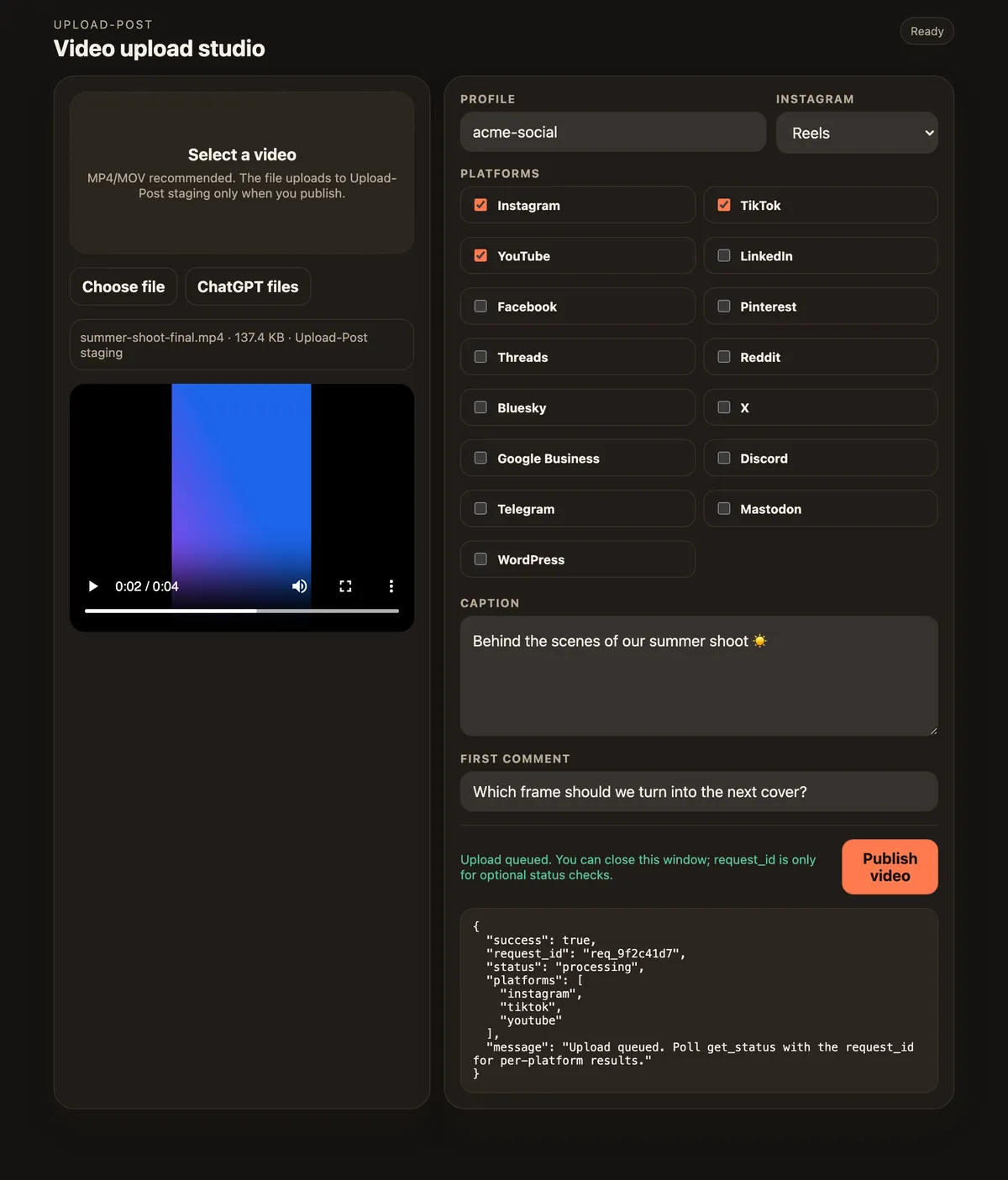
In ChatGPT, the Upload-Post app can open an upload studio: pick the file, tick the networks, write the caption and publish. Shown with a demo profile.
Best for: Teams that want open source or self-hosting
An open-source scheduler with the longest channel list here and an MCP server on every plan. Its 13 tools schedule, draft and publish, and generate images and video. Self-hosting is free but means registering your own app on each network.
The scheduling app’s official MCP server manages the queue and scheduling, reads aggregated post metrics and works with ideas and templates. Media is attached by URL. If your queue already lives in Buffer, this keeps it there.
Best for: Small setups billed per connected account
A unified API formerly known as Late. About 20 core tools plus one generated tool per API endpoint, which its docs say reaches DMs, ads and analytics. Media goes through a browser upload link. Pricing is per connected account, $6 each from the third to the tenth.
Best for: Existing Ayrshare API customers working in code editors
One of the older unified social media APIs. Its 33 tools cover posts, history, analytics, comments, DMs, profiles, media and ads. Because it only accepts a fixed key, its docs say personal connectors on claude.ai, Claude Desktop and mobile cannot authenticate; it works in clients where you set headers, such as Claude Code or Cursor.
Best for: Creators who also want AI images and video from templates
A content creation and posting tool. Its 35 tools publish, schedule, read analytics, run automations and generate images and videos from templates. Its docs note that creating an API key during the trial ends the trial.
Best for: Metricool users who want a connector listed in Claude’s directory
Listed in Claude’s connector directory. Through MCP it works with brands, analytics (ads included) and the planner: create and edit scheduled posts, best times to post, send for review. On the Free plan scheduling is capped at 20 posts a month and analytics at 30 days.
Best for: Creators cross-posting short videos from a chat
A cross-posting tool whose 16 tools post, schedule, read analytics and upload media up to 500 MB. It is listed in Claude’s connector directory and as a ChatGPT app.
A posting API billed per post after an included allowance. Its 28 tools schedule, read post and account metrics, reply to comments and upload media, and it accepts your own platform credentials.
Best for: Low post volumes, developers comfortable with code mode
Runs in “code mode”: the agent writes code against Post for Me’s TypeScript SDK and it runs in a sandbox. Its docs say the server must run locally for now.
A self-hosted scheduler. Its MCP server covers scheduling and the queue, analytics and best posting times, media upload by URL and tags. It is not in the free Lite edition.
Zapier’s MCP server exposes actions from its 9,000+ apps, so an agent can post through any social app you enable there. It works on every Zapier plan and each successful call costs two tasks. Useful when posting is one step in a longer workflow; a dedicated server gives the agent more posting options per network. Source: Zapier MCP docs.
How to connect an MCP server to Claude, ChatGPT and your editor
The same steps work for any remote server; the examples use Upload-Post’s URL.
Claude (web, desktop and Cowork)
If the server ships a plugin in Claude’s plugin directory, install it and connect under Customize → Connectors. Upload-Post has one: install it, then click Upload-Post → Connect. For any other remote server, open Customize → Connectors, click + Add, choose Add custom connector, paste the URL and sign in. Then turn the connector on in a chat from the + menu. On Team and Enterprise plans an owner adds custom connectors first under Organization settings → Connectors. Steps from Claude’s help center.
ChatGPT
Plugins reviewed by OpenAI appear in ChatGPT’s Plugins (formerly Apps): search for Upload-Post, click Install and connect. A server that is not listed can be added by hand with + → Add custom MCP server; write actions for custom servers are on Business, Enterprise and Edu workspaces, on the web. ChatGPT setup guide.
Claude Code, Codex, Cursor, VS Code and Windsurf
Register the URL from the terminal in Claude Code or Codex, or add it to your editor’s MCP configuration. Each one opens the sign-in page the first time a tool runs. Gemini CLI installs the same server as an extension: gemini extensions install https://github.com/Upload-Post/upload-post-plugin.
claude-code.sh
claude mcp add --transport http upload-post \
  https://mcp.upload-post.com/mcp
Social media MCP servers: frequently asked questions
What is the best MCP server for social media?
It depends on how you work. Upload-Post (our product) is a hosted server with more than 50 tools for 22 networks, OAuth sign-in and a free plan. Postiz is the open-source option with about 30 channels. Buffer suits people already scheduling with Buffer, and Metricool and Post Bridge are listed in Claude’s connector directory. Ayrshare and Zernio are established APIs with MCP servers.
What does a social media MCP server do?
It exposes publishing, scheduling and analytics as tools that an AI assistant can call. Instead of writing code against each network’s API, you ask Claude or ChatGPT to post a video to TikTok and Instagram, and the assistant calls the server, which holds the connection to your accounts.
Which social media MCP servers work in claude.ai and ChatGPT?
Remote servers that sign in with OAuth: Upload-Post, Blotato, Buffer, Zernio, Outstand, Post Bridge, Metricool and Mixpost all document OAuth. Ayrshare’s docs say personal connectors on claude.ai cannot authenticate with it, and bundle.social and Post for Me run locally, so they need a desktop or terminal client.
Do I need a developer app on each social network?
Not with a hosted service. Upload-Post, Ayrshare, Zernio, Buffer and similar services run apps that the networks have already approved, so you only sign in and connect your accounts. Self-hosted servers such as Postiz or Mixpost need your own app on each network.
Can ChatGPT post to social media through an MCP server?
Yes. ChatGPT connects to MCP servers as plugins (formerly apps). Upload-Post is a plugin reviewed by OpenAI, so you can search for it in Plugins and install it. Other servers can be added by hand with Plugins, +, Add custom MCP server; write actions for custom servers are on Business, Enterprise and Edu workspaces, on the web.
Is there a free MCP server for social media?
Several have a free tier. Upload-Post’s Free plan includes the MCP server with 10 uploads a month and no card. Buffer’s free plan includes its MCP with one API key, Metricool’s works on its Free plan with OAuth, Zernio’s first two accounts are free, and Postiz is free to self-host.
Is a social media MCP server the same as a social media data MCP?
No. Posting servers like the ones on this page publish and schedule to your own accounts. Data servers, such as scraping services’ social media MCPs, read public posts and profiles but do not publish for you.
Which MCP servers work with Claude Code and Cursor?
Any of them. Remote servers are added by URL and local ones by command. For Upload-Post, run claude mcp add --transport http upload-post https://mcp.upload-post.com/mcp in Claude Code, or add the URL to the mcpServers block in Cursor. The Upload-Post plugin for Claude Code adds the same server plus ready-made skills.
We use strictly necessary cookies to run this site. With your permission we would also like to measure how the site is used (analytics) and how our ads perform (marketing). Nothing optional is loaded until you choose. Cookie Policy · Privacy Policy
Cookie preferences
Choose which categories you allow. You can change this at any time from "Cookie settings" in the footer. Cookie Policy
Strictly necessary Always active
Needed for the site to work: your consent record (up_consent) and your light/dark theme preference. Exempt from consent under art. 22.2 LSSI.
Analytics Always active
OpenPanel, self-hosted on our own servers (api.openpanel.fotoexamen.com). Aggregated page and feature usage so we can see what to improve. No data goes to an advertising network.
Marketing and attribution
Google Ads conversion measurement, the Reddit advertising pixel, and our own affiliate/attribution cookies (aff_ref, up_attribution). These tell us which campaign or affiliate brought you here.

 TikTok
  Instagram
  YouTube
  LinkedIn
  Facebook
  X
X  Threads
  Pinterest
  Reddit
  Bluesky
  Discord
  Telegram
  Slack
Slack  Mastodon
  Nostr
Nostr  Lemmy
Lemmy  Dev.to
  Hashnode
  WordPress
  Whop
Whop  Listmonk
  ChatGPT
 Claude
 Gemini