Publish a product once. The plugin posts its photos and a designed vertical video to TikTok, Instagram, Facebook, Pinterest and 13 social networks. Then it tells you which post made sales.
GPL licensed · WordPress 6.0+ · Awaiting review on the WordPress.org directory
Not another share button. A publishing engine that turns your catalog into social content, and measures it in euros, not likes.
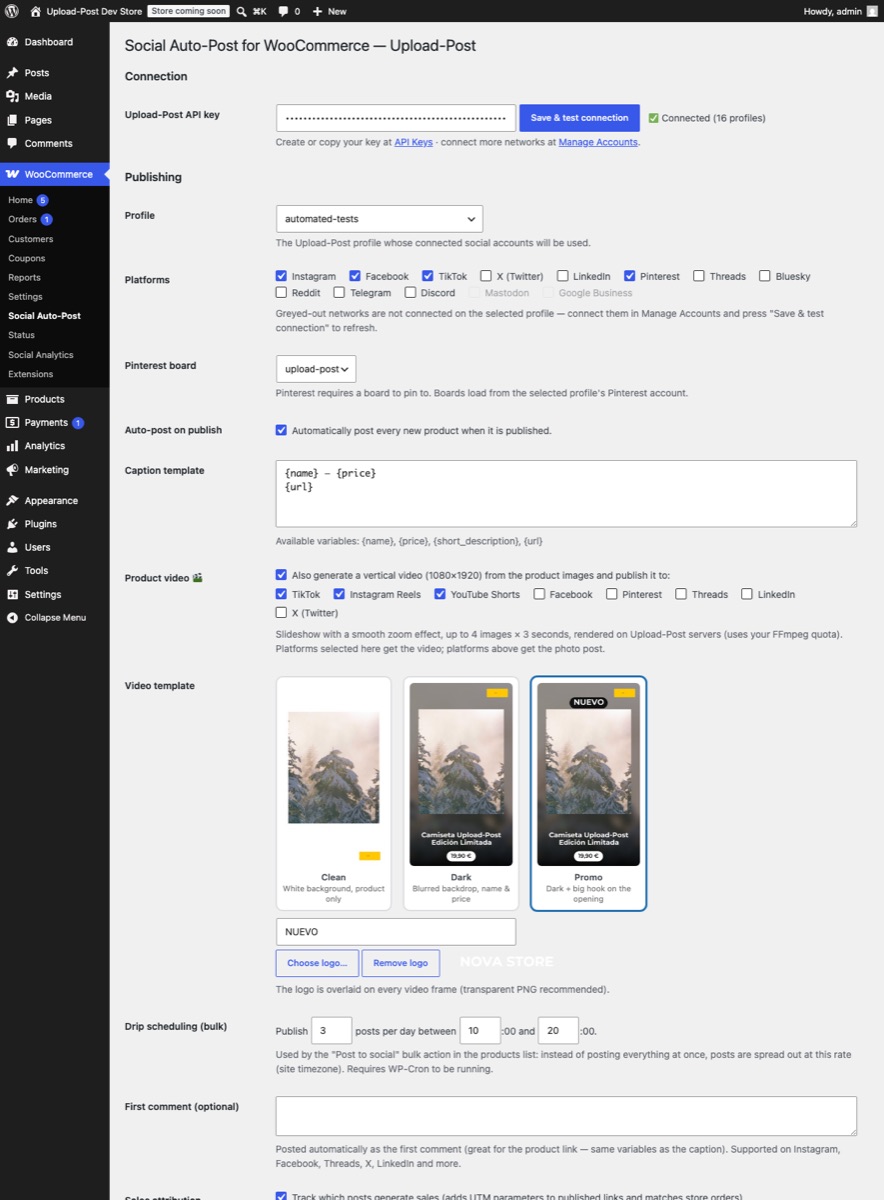
Publish a product and its photos go out to every network you selected, with a caption built from your template: name, price, description and link.
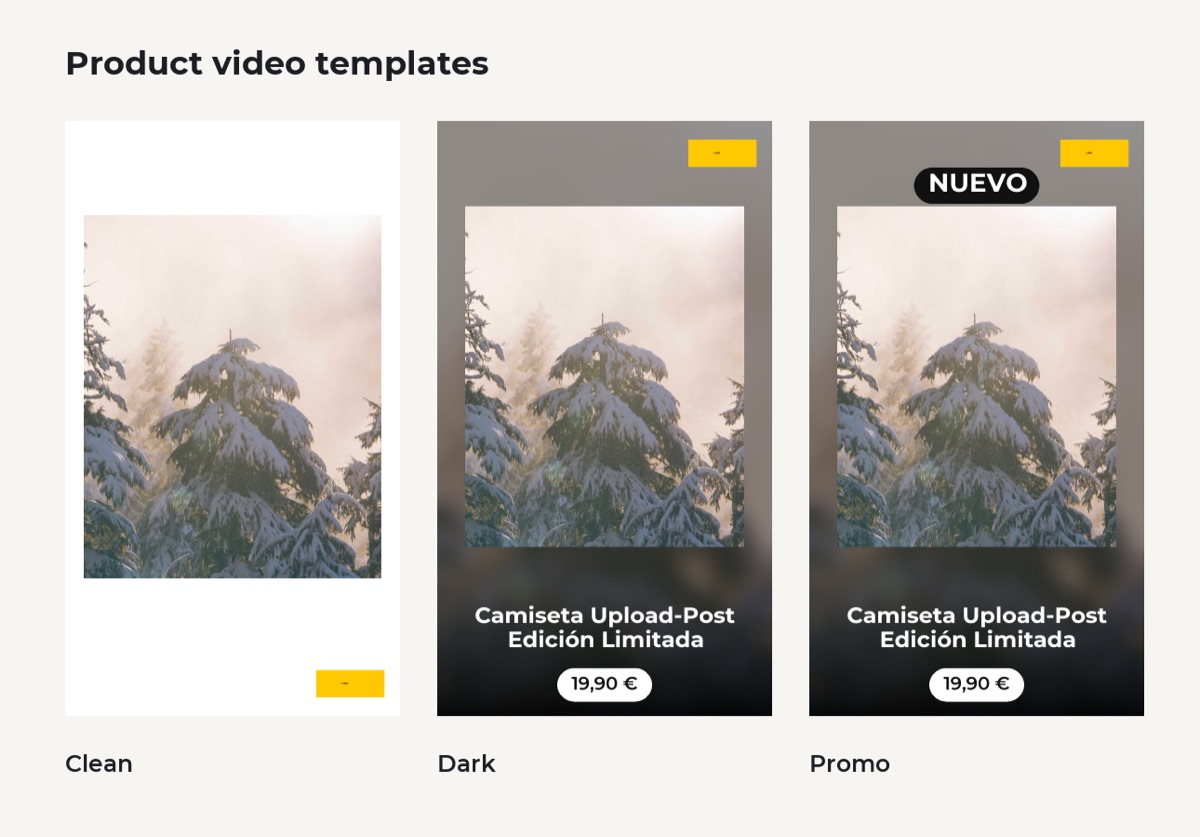
Vertical 1080×1920 videos for TikTok, Reels and Shorts, generated from your product images. Three templates, your logo, a hook text, rendered in the cloud.
UTM-tagged links plus automatic order matching: see exactly which post generated which orders, and how much revenue each network drives.
Bulk-post your whole catalog at a healthy pace (2–3 posts per day inside your time window) instead of flooding your feeds in one hour.
Views, likes, comments, engagement, orders and revenue per posted product, refreshed automatically every day, with direct links to every post.
Bring your own free Google Gemini key and captions are written per product, in your store’s language, with hashtags. No key? Templates work great.
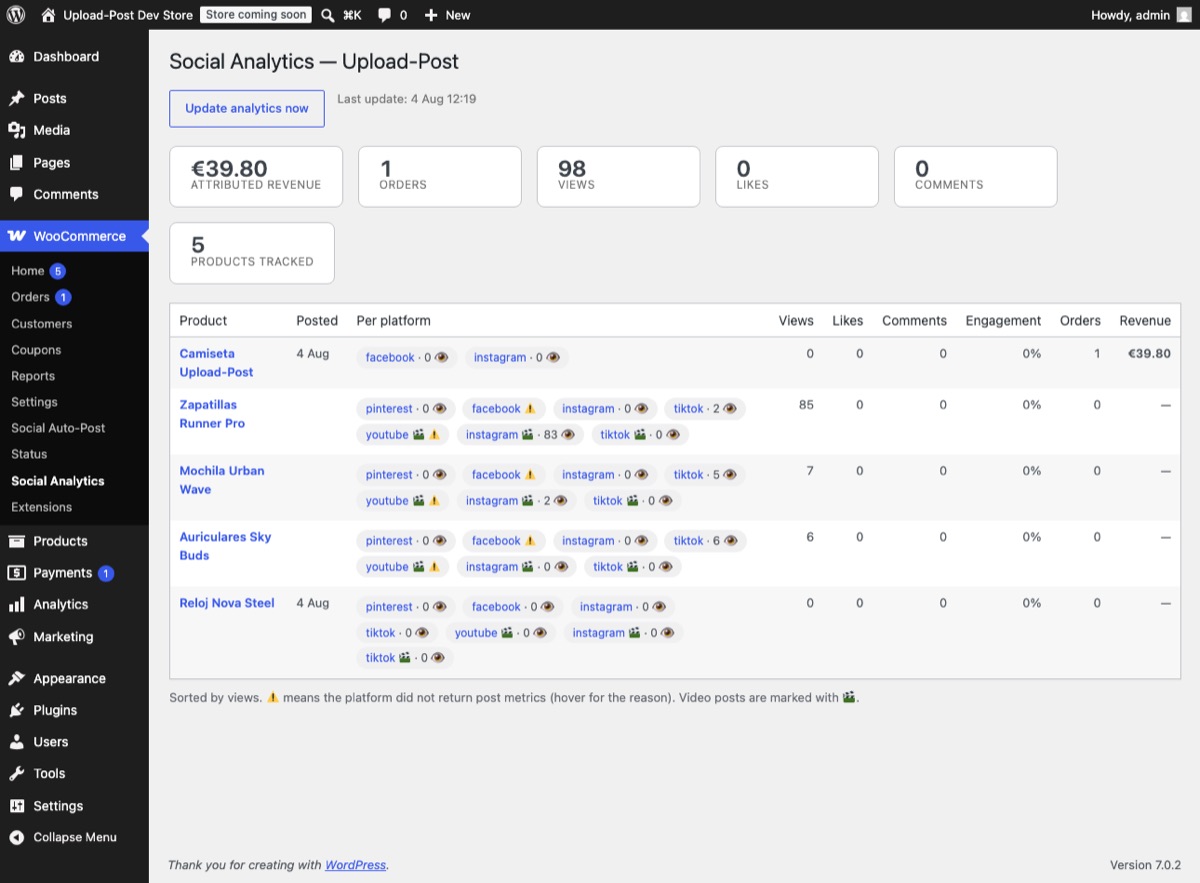
Every link the plugin publishes is UTM-tagged per product and per network. When a visitor buys, the order is stamped with the post that brought them: first-party, inside your own store, GDPR-friendly.
Create a free Upload-Post account and connect Instagram, TikTok, YouTube and the rest once, via each network’s official login.
Install the plugin, paste the key in WooCommerce → Social Auto-Post and press “Save & test”. Your profiles and connected networks load automatically.
That’s it. Photos and video go out on their own, and results, including revenue, appear in Social Analytics.
Yes. The plugin is free and open source (GPL). It works with a free Upload-Post account that includes 10 posts per month. Paid plans add more volume, more profiles and the posting queue.
Photo posts publish to 13 networks: Instagram, Facebook, TikTok, X (Twitter), LinkedIn, Pinterest, Threads, Bluesky, Reddit, Telegram, Discord, Mastodon and Google Business. Product videos publish to TikTok, Instagram Reels, YouTube Shorts, Facebook, Pinterest, Threads, LinkedIn and X.
Never. You connect your accounts once in the Upload-Post dashboard using each network’s official login (OAuth). The plugin only stores your Upload-Post API key.
The plugin composes a designed vertical video (1080×1920) from your product images: choose one of three templates, add your logo and a hook text, and it renders in the cloud, no ffmpeg or heavy processing on your hosting.
Every published link carries UTM parameters. When a visitor buys after clicking one of your posts, the order is matched automatically and the Social Analytics screen shows orders and revenue per post and per network.
The plugin has been submitted to the WordPress.org directory and is awaiting review. Meanwhile you can download the ZIP from this page and install it from WordPress → Plugins → Add New → Upload Plugin.
Step by step, with WooCommerce social plugins compared: how to auto-share WooCommerce products on social media.
Free plugin, free Upload-Post tier, five-minute setup. Your next product launch posts itself.
We use strictly necessary cookies to run this site. With your permission we would also like to measure how the site is used (analytics) and how our ads perform (marketing). Nothing optional is loaded until you choose. Cookie Policy · Privacy Policy
Choose which categories you allow. You can change this at any time from "Cookie settings" in the footer. Cookie Policy
Needed for the site to work: your consent record (up_consent) and your light/dark theme preference. Exempt from consent under art. 22.2 LSSI.
OpenPanel, self-hosted on our own servers (api.openpanel.fotoexamen.com). Aggregated page and feature usage so we can see what to improve. No data goes to an advertising network.
Google Ads conversion measurement, the Reddit advertising pixel, and our own affiliate/attribution cookies (aff_ref, up_attribution). These tell us which campaign or affiliate brought you here.

 TikTok
  Instagram
  YouTube
  LinkedIn
  Facebook
  X
X  Threads
  Pinterest
  Reddit
  Bluesky
  Discord
  Telegram
  Slack
Slack  Mastodon
  Nostr
Nostr  Lemmy
Lemmy  Dev.to
  Hashnode
  WordPress
  Whop
Whop  Listmonk
  ChatGPT
 Claude
 Gemini