
 TikTok
  Instagram
  YouTube
  LinkedIn
  Facebook
  X
X  Threads
  Pinterest
  Reddit
  Bluesky
  Discord
  Telegram
  Slack
Slack  Mastodon
  Nostr
Nostr  Lemmy
Lemmy  Dev.to
  Hashnode
  WordPress
  Whop
Whop  Listmonk
  ChatGPT
 Claude
 Gemini
Connect Google Drive to Instagram: Free n8n Workflow
Drop a video in a Google Drive folder and it goes live on Instagram, TikTok and YouTube with an AI-written caption.
Created by
carlosgracia
• February 12, 2025
Overview
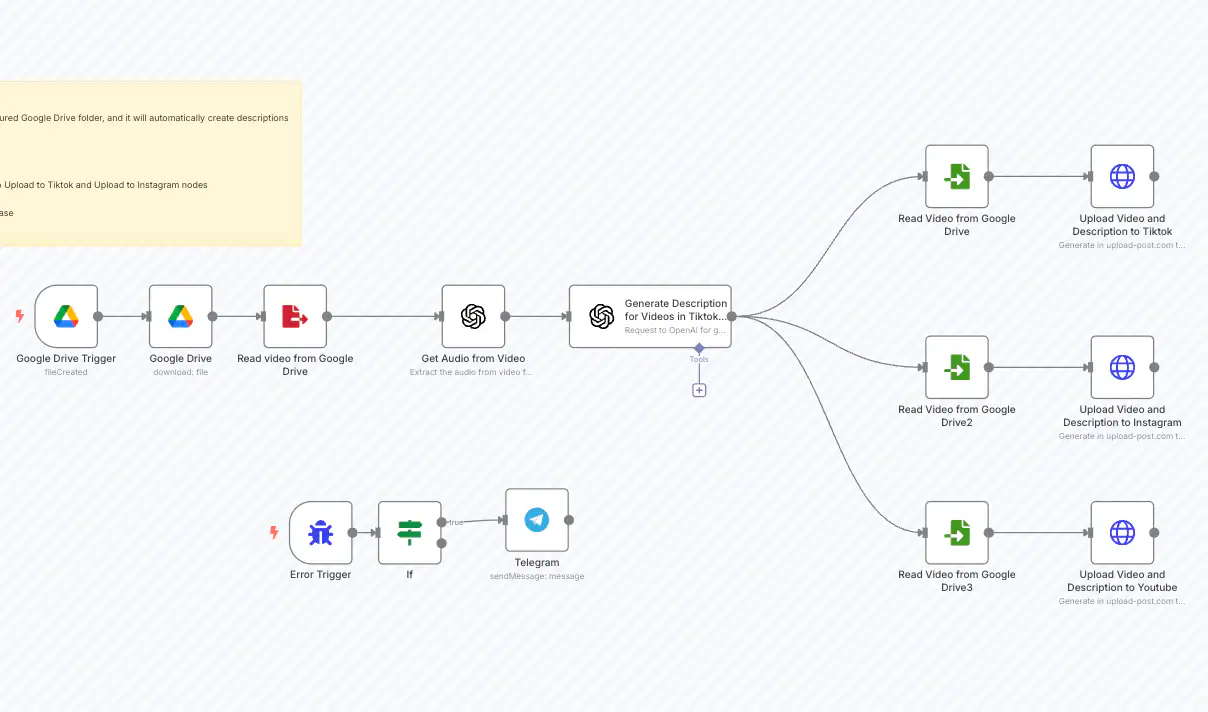
Instagram has no built-in way to pull videos from Google Drive, so most people download the file to their phone and upload it by hand. This n8n workflow connects Google Drive to Instagram for you: it watches a Drive folder, and every time a new video lands there it transcribes the audio with OpenAI, writes a caption and publishes the video through Upload-Post. The same run also posts it to TikTok and YouTube.
How to connect Google Drive to Instagram
- Connect your Instagram account in Upload-Post (Instagram needs a Business or Creator account).
- Import the template in n8n and add your Google Drive credentials.
- Pick the Drive folder you want to watch.
- Paste your Upload-Post API key and your OpenAI key.
- Drop a test video in the folder and check that it shows up on Instagram.
Template
- n8n: Open workflow
Who is this for?
- Content Creators & Influencers
- Digital Marketers
- Social Media Managers
Key benefits
- Auto-Uploads: Monitors Drive folder.
- Smart Captions: AI generates descriptions from audio.
- Consistency: Same video on Instagram, TikTok and YouTube.
- Alerts: Telegram notifications for errors.
Detailed flow
- Trigger: New video in Google Drive.
- Transcribe: OpenAI extracts audio text.
- Generate: GPT writes platform-specific captions.
- Publish: Uploads to Instagram, TikTok and YouTube via Upload-Post.
- Notify: Sends alerts if issues arise.
Setup (step-by-step)
- Get Upload-Post API token.
- Configure Google Drive OAuth and folder.
- Add OpenAI key.
- (Optional) Set up Telegram bot for alerts.
Related templates
- Want to cover more networks from the same folder? See Google Drive to social media.
- Need a log of every post? Use Google Drive to Instagram, TikTok & YouTube with Airtable tracking.